


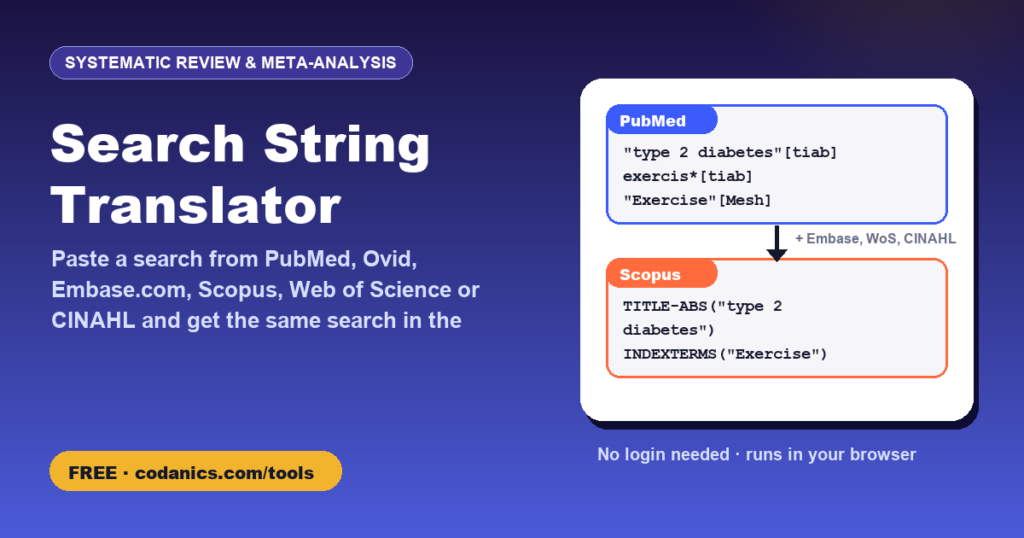
Search String Translator: PubMed, Ovid MEDLINE/Embase, Embase.com, Scopus, Web of Science and CINAHL
Built your search in PubMed or Ovid and now need it for Embase, Scopus, Web of Science and CINAHL? Paste the string (or a numbered, line-by-line Ovid search) and get it rewritten in the syntax of every other database: field tags, phrases, truncation, proximity operators and subject headings. A list of warnings shows exactly what you must check by hand, such as MeSH terms that need an Emtree equivalent.
- PriceFree, no login or sign-up needed
- Your dataProcessed in your browser, never uploaded
- Works onPhone, tablet or computer, any modern browser
- Made byDr. Muhammad Aammar Tufail, Codanics
- Published17 November 2026
- Last updated16 November 2026
📚 How to cite this tool
This tool is free. If it helped your thesis, paper, report or assignment, please cite it. It keeps the tools free and helps other students find them.
Tufail, M. A. (2026). Search string translator: PubMed, Ovid MEDLINE/Embase, Embase.com, Scopus, Web of Science and CINAHL [Online tool]. Codanics. Retrieved 16 November 2026, from https://codanics.com/tools/search-string-translator/
In-text citation: (Tufail, 2026) · Narrative: Tufail (2026)
The access date is today’s date, filled in automatically. Author: Muhammad Aammar Tufail. Published 17 November 2026.
How to use the search string translator
- Paste your search string. It can be a single line or a numbered line-by-line search copied from Ovid or a search history (lines such as
1. exp Diabetes Mellitus, Type 2/and3 or/1-2). - Leave the syntax on Detect automatically, or choose the database it came from if the detection is wrong.
- Click Translate. The same search appears in PubMed, Ovid MEDLINE, Ovid Embase, Embase.com, Scopus, Web of Science and CINAHL syntax.
- Read the warnings: they list subject headings to look up in the other thesaurus, fields that do not exist everywhere, proximity and wildcard differences, and publication-type filters.
- Copy each translation into the database, fix the headings, run it and compare the hits. Download all translations as a text file for your search appendix.
Why searches must be translated
A systematic review searches several databases, and each one has its own syntax. PubMed writes exercis*[tiab], Ovid writes exercis*.ti,ab., Scopus writes TITLE-ABS(exercis*), Web of Science writes TS=(exercis*) and Embase.com writes exercis*:ti,ab. Subject headings differ too: MeSH in MEDLINE, Emtree in Embase and CINAHL Subject Headings in CINAHL. Translating by hand is slow and error-prone. This tool does the mechanical part and flags what needs a human decision.
How elements are translated
| Element | PubMed | Ovid | Embase.com | Scopus | Web of Science | CINAHL |
|---|---|---|---|---|---|---|
| Title/abstract | [tiab] | .ti,ab. | :ti,ab | TITLE-ABS() | TS=() | TI … OR AB … |
| Title/abstract/keywords | [tiab] | .ti,ab,kf. (.ti,ab,kw. in Embase) | :ti,ab,kw | TITLE-ABS-KEY() | TS=() | TI … OR AB … |
| Phrase | “physical activity” | physical activity | ‘physical activity’ | “physical activity” | “physical activity” | “physical activity” |
| Truncation | * | * or $ | * | * | * | * |
| Proximity (≤ 2 words apart) | “a b”[tiab:~2] | a adj3 b | a NEAR/2 b | a W/2 b | a NEAR/2 b | a N2 b |
| Exploded heading | “X”[Mesh] | exp X/ | ‘x’/exp | INDEXTERMS(“X”)* | TS=”X”* | (MH “X+”) |
| Heading, not exploded | “X”[Mesh:NoExp] | X/ | ‘x’/de | INDEXTERMS(“X”)* | TS=”X”* | (MH “X”) |
* Scopus and Web of Science have no thesaurus to explode, so headings become index-term or topic searches and you should add free-text synonyms.
What the tool cannot do (honestly)
- Map headings between thesauri. MeSH, Emtree and CINAHL headings often have different names and tree structures. The tool copies the heading and warns you; look each one up in the target thesaurus.
- Guarantee identical results. Field definitions, stemming, Automatic Term Mapping in PubMed, and the way proximity operators count words all differ slightly. Always compare hit counts and test with known relevant papers.
- Translate filters and limits such as publication types, dates and languages one-to-one. Use validated filters for each database (for example the Cochrane highly sensitive RCT filter for MEDLINE) and apply limits in the interface.
- Very unusual syntax (field codes for author affiliations, CAS numbers, database-specific commands) may not be recognised; such terms are flagged.
Frequently asked questions
Is this like the Polyglot Search Translator?
It has the same aim: to translate the syntax of a search between databases while you keep control of the subject headings. It is an independent, free, rule-based tool that runs in your browser and also reads Scopus, Web of Science and CINAHL syntax as input.
Does it translate MeSH terms into Emtree?
No, and no automatic tool does this reliably. It copies each heading into the correct syntax for the target database and warns you to look it up in Emtree or the CINAHL headings, which often use different names.
Can I paste a line-by-line Ovid search?
Yes. Paste the numbered lines (for example ‘1. exp Diabetes Mellitus, Type 2/’ … ’10. 3 and 6 and 9′). Line combinations such as or/1-5 and ‘3 and 6’ are resolved into one combined search string for each database.
Why are my results different in each database?
Databases index different journals and use different fields, thesauri and search rules. Different numbers are normal; the aim is equivalent searches, not identical counts.
Does the tool run the searches?
No. It only rewrites the text. Nothing is sent to PubMed, Ovid, Elsevier, Clarivate, EBSCO or anyone else.
Should a librarian check my translated search?
Yes, if possible. Peer review of search strategies with the PRESS checklist is recommended for systematic reviews.
Do I need to log in or create an account to use the search string translator?
No. There is no login, no sign-up and no email required. Open the page and start using it straight away, for free, on any device.
How do I cite this tool in my thesis or paper?
Use the citation box on this page. In APA 7th edition: Tufail, M. A. (2026). Search string translator: PubMed, Ovid MEDLINE/Embase, Embase.com, Scopus, Web of Science and CINAHL [Online tool]. Codanics. Retrieved [date you used it], from https://codanics.com/tools/search-string-translator/. BibTeX, RIS (EndNote, Mendeley, Zotero), MLA, Harvard, Chicago and Vancouver formats are also available.
Free guides and courses from Codanics
More free tools
See all free Codanics tools → · Codanics on YouTube · WhatsApp channel