5 ViroProfiler: an automated A–Z pipeline
5.1 ViroProfiler: an automated A–Z viromics pipeline
Before you build a viromics workflow by hand, it helps to see the whole thing run end to end. ViroProfiler is a containerized Nextflow pipeline that turns raw reads into an annotated, quantified catalogue of viral genomes — read QC, assembly, viral identification, CheckV quality, vOTU clustering, taxonomy, host and lifestyle prediction, functional annotation, and abundance — from a single command. This chapter is a tested, reproducible walkthrough: install it, set up and verify its databases, run the bundled test dataset, then run a full analysis on public virome reads — including the failure modes the pipeline does not warn you about, and how to interpret every output it produces.
Run this chapter first to get real results quickly and see the shape of a complete viromics study. Then work through the step-by-step pipeline to understand what each stage is doing under the hood and when to deviate from the defaults.
Learning objectives — by the end of this chapter you will be able to:
- install ViroProfiler with Singularity/Apptainer and a pinned Nextflow, in a self-contained project;
- set up the databases and, crucially, verify they are complete rather than trusting a “success” message;
- run the bundled test dataset and a full analysis on public virome reads, end to end;
- recognize and fix the pipeline’s real failure modes (read-only
$HOME, dead dbCAN downloads, silent 1-CPU/10-GB defaults, iPHoP out-of-memory); and - interpret every output table — vOTUs, CheckV quality, abundance, taxonomy, host, lifestyle, and function.
This chapter runs an automated pipeline: one command orchestrating many tools. The complete pipeline chapter then rebuilds the same workflow by hand, tool by tool, so you understand and control every step. Read this one for the whole picture and fast results; read that one to learn the internals.
This is a heavyweight, real-world pipeline: it needs a Linux workstation, Singularity/Apptainer, and roughly 420 GB of databases. The data/toy/ and data/example/ datasets used elsewhere in the book are for practicing commands; ViroProfiler is where you run a genuine analysis on real virome data.
5.2 What ViroProfiler does
ViroProfiler takes raw metagenomic (or virome) sequencing reads and produces an annotated, quantified catalogue of viral genomes. The published description is:
Ru, Jinlong, et al. “ViroProfiler: a containerized bioinformatics pipeline for viral metagenomic data analysis.” Gut Microbes 15.1 (2023): 2192522. https://doi.org/10.1080/19490976.2023.2192522
5.2.1 The workflow
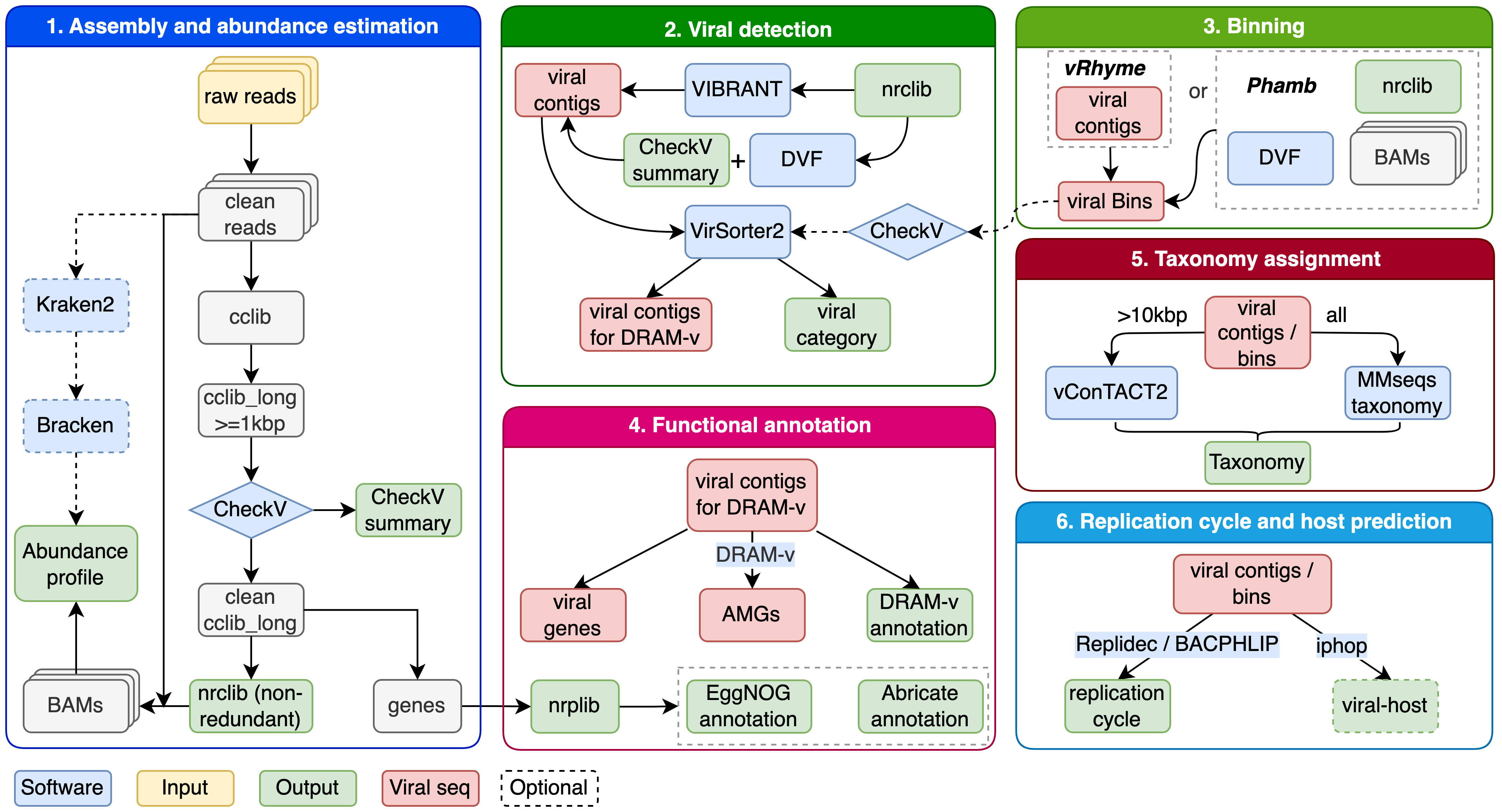
The stages, shown in Figure 5.1, are:
- Read QC: quality control and adapter/quality trimming
- Assembly: metagenomic assembly into contigs
- Viral identification: find which contigs are viral
- Quality assessment: completeness and contamination of viral genomes
- Clustering: collapse to a non-redundant viral contig library (vOTUs)
- Gene prediction and annotation: genes, function, AMGs
- Taxonomy: classify viral contigs
- Host prediction: predict bacterial hosts for phages
- Lifestyle prediction: lytic vs. lysogenic
- Abundance: map reads back to quantify each vOTU per sample
5.2.2 Tools used
| Tool | Role | Links |
|---|---|---|
| Nextflow | Workflow engine | docs · paper |
| nf-core | Pipeline framework | paper |
| FastQC | Read quality reports | docs |
| fastp | Trimming and filtering | paper |
| BBMap | Decontamination | guide |
| metaSPAdes | Metagenomic assembly | paper |
| Bowtie 2 | Read mapping | paper |
| CoverM | Coverage and abundance | : |
| CheckV | Viral genome QC | paper |
| VirSorter2 | Viral contig detection | paper |
| DeepVirFinder | ML viral detection | paper |
| VIBRANT | Viral detection + annotation | paper |
| vRhyme | Viral binning | paper |
| Phamb | Viral binning | paper |
| DRAM-v | Gene annotation, AMGs | paper |
| dbCAN | CAZyme annotation | paper · S3 releases |
| eggNOG-mapper | Orthology annotation | paper |
| abricate | AMR/virulence genes | : |
| vConTACT2 | Gene-sharing taxonomy | paper |
| MMseqs2 | Fast search / taxonomy | paper |
| Kraken2 / Bracken | Read-level taxonomy | paper |
| iPHoP | Host prediction | paper |
| BACPHLIP | Lifestyle prediction | paper |
| Replidec | Lifestyle prediction | : |
5.3 System requirements
| Resource | Minimum | Recommended | Notes |
|---|---|---|---|
| OS | Linux x86-64 | : | Tested on Linux Mint 22 / Ubuntu noble |
| CPU | 4 cores | 12+ | vConTACT2 and DRAM benefit most |
| RAM | 24 GB | 32 GB+ | iPHoP peaked at 33.7 GB in the reference run |
| Swap | 32 GB | 32 GB | Required at ≤32 GB RAM: iPHoP exceeds physical RAM, see Section 5.4.6 |
| Disk | 450 GB | 600 GB+ | Databases alone are ~420 GB |
| Filesystem | ext4/xfs | : | Not exFAT/NTFS: see note below |
Filesystem matters. Singularity’s layer cache names entries sha256:<hex> and its build sandbox needs symlinks. exFAT supports neither, and image builds fail with could not finalize cached file ... invalid argument. Use ext4 or xfs.
Disk budget (measured on a complete install):
| Database | Size |
|---|---|
| iPHoP | 199 GB |
| DRAM | 203 GB |
| VIBRANT | 11 GB |
| VirSorter2 | 11 GB |
| CheckV | 7 GB |
| taxonomy (MMseqs vRefSeq) | 4 GB |
| Container images | ~5 GB |
| Total | ~440 GB |
5.4 Installation
Everything below is self contained. You can copy each block in turn and end up with a working installation without needing any file from this repository.
All paths derive from a single variable, VP_HOME, so nothing is tied to one machine.
Every command in this chapter is also packaged as a ready-to-run script — download the set and run them in order, or copy the blocks by hand:
5.4.1 Prerequisites
Singularity (or Apptainer) and conda must be present.
# Debian / Ubuntu / Linux Mint
sudo apt update && sudo apt install -y singularity-container

# Fedora / RHEL
sudo dnf install -y singularity-ce

singularity --version
If conda is missing, install Miniforge. Verify both:
singularity --version     # expect 3.x or 4.x
conda --version
5.4.2 Create the project folder
Pick a disk with at least 650 GB free. Databases take about 420 GB, and the work directory needs room for intermediate files.
# Choose any location you like. Everything the pipeline writes stays inside it.
mkdir -p ~/viroprofiler
cd ~/viroprofiler

export VP_HOME="$(pwd)"
echo "VP_HOME is ${VP_HOME}"

# Check you really have the space
df -h "${VP_HOME}"
Create the directory layout:
mkdir -p "${VP_HOME}"/{db,work,data,container-home,nextflow-singularity-cache,singularity-cache,singularity-tmp}
ls "${VP_HOME}"| Directory | Purpose |
|---|---|
db/ |
Databases, about 420 GB |
work/ |
Nextflow intermediate files |
data/ |
Your input reads |
container-home/ |
Writable HOME for containers, see Section 5.8.1 |
nextflow-singularity-cache/ |
Built .img files |
singularity-cache/ |
OCI layer cache |
singularity-tmp/ |
Image build sandbox |
5.4.3 Add the Singularity settings to your shell
These three variables keep every cache inside the project. Without them, Singularity writes multi gigabyte images into $HOME, which is small on most systems, and image builds fail when it fills up.
cat >> ~/.bashrc <<EOF

# ---------------- ViroProfiler ----------------
export VP_HOME="${VP_HOME}"
export NXF_SINGULARITY_CACHEDIR="${VP_HOME}/nextflow-singularity-cache"
export SINGULARITY_CACHEDIR="${VP_HOME}/singularity-cache"
export SINGULARITY_TMPDIR="${VP_HOME}/singularity-tmp"
export NXF_VER=25.10.2
# ----------------------------------------------
EOF

source ~/.bashrc
Confirm they are set:
echo "${VP_HOME}"
echo "${NXF_SINGULARITY_CACHEDIR}"
echo "${SINGULARITY_CACHEDIR}"
echo "${SINGULARITY_TMPDIR}"The filesystem matters. Use ext4 or xfs. Singularity’s layer cache names entries sha256:<hex> and its build sandbox needs symlinks, neither of which exFAT or NTFS can represent. Image builds fail there with could not finalize cached file ... invalid argument.
If you re-install later, edit these lines rather than appending new ones. A stale NXF_SINGULARITY_CACHEDIR pointing at an old project is a common cause of Failed to create Singularity cache directory.
5.4.4 Conda environment and Nextflow
conda create -n viroprofiler_env -c bioconda -c conda-forge nextflow -y
conda activate viroprofiler_env

# Pin the version, see the warning below
export NXF_VER=25.10.2
nextflow -v
Expected output:
nextflow version 25.10.2.10555Nextflow 26.x cannot run this pipeline. Its stricter config parser rejects ViroProfiler v0.2.4’s own nextflow.config, specifically the legacy def check_max(obj, type) {...} function, and the run dies before any process starts with Unexpected input: '('. Always keep NXF_VER=25.10.2 exported.
If nextflow -v reports a different version, another copy is ahead on your PATH. Force the environment’s own:
export PATH="${CONDA_PREFIX}/bin:${PATH}"
nextflow -v
5.4.5 Create local.config
This file carries every fix described in section 6. It detects your CPU and RAM and assigns resources to every process explicitly, which the pipeline itself does not do.
Create it in one command:
cat > "${VP_HOME}/local.config" <<'CONFIGEOF'
/*
 * ViroProfiler local execution config.
 * Paths come from $VP_HOME, or from the directory you launch nextflow in.
 * Resources are detected from the machine and divided into tiers.
 */

def VP_HOME = System.getenv('VP_HOME') ?: System.getProperty('user.dir')

def detectedCpus = Runtime.runtime.availableProcessors()
def detectedMemGb = {
    try {
        def line = new File('/proc/meminfo').readLines().find { it.startsWith('MemTotal') }
        return (long) ((line.replaceAll(/\D/, '') as long) / 1024 / 1024)
    } catch (Exception e) { return 16L }
}()

// Leave 1 core and 3 GB for the OS. A fully committed workstation becomes
// unusable, and at 100% commitment an OOM kills tasks instead of slowing them.
def MAX_CPUS   = (System.getenv('VP_MAX_CPUS')   ?: "${Math.max(1, detectedCpus - 1)}") as int
def MAX_MEM_GB = (System.getenv('VP_MAX_MEM_GB') ?: "${Math.max(8, detectedMemGb - 3)}") as int

def CPU_HEAVY  = MAX_CPUS
def CPU_MEDIUM = Math.max(2, (int) (MAX_CPUS / 2))
def CPU_LIGHT  = Math.max(2, (int) (MAX_CPUS / 6))
def MEM_HEAVY  = "${MAX_MEM_GB}.GB"
def MEM_MEDIUM = "${Math.max(6, (int) (MAX_MEM_GB / 2))}.GB"
def MEM_LIGHT  = "${Math.max(4, (int) (MAX_MEM_GB / 6))}.GB"
def CPU_IPHOP  = Math.max(1, Math.min(8, MAX_CPUS - 2))

singularity {
    enabled    = true
    autoMounts = true
    cacheDir   = "${VP_HOME}/nextflow-singularity-cache"

    // -B binds the project so containers can read db/ and write work/.
    // Never bind over $HOME: Nextflow separately binds the pipeline's scripts
    // from ~/.nextflow/assets/.../bin onto PATH, and mounting over your home
    // hides that bind, giving "run_checkv.sh: command not found".
    //
    // --writable-tmpfs gives an in-memory overlay so DRAM can create the
    // symlink /opt/conda/db2 inside the read-only image.
    runOptions = "-B ${VP_HOME} --writable-tmpfs"
}

// Writable HOME for containers. Nextflow uses --no-home, so $HOME points into
// the read-only image layer and VirSorter2 dies creating ~/.virsorter.
env {
    HOME = "${VP_HOME}/container-home"
}

executor {
    name         = 'local'
    cpus         = MAX_CPUS
    memory       = "${MAX_MEM_GB}.GB"
    queueSize    = 8
    pollInterval = '5 sec'
}

process {
    cpus   = CPU_LIGHT
    memory = MEM_LIGHT
    time   = '48.h'

    withLabel: 'setup' {
        errorStrategy = { task.attempt <= 3 ? 'retry' : 'finish' }
        maxRetries    = 3
        cpus          = CPU_MEDIUM
        memory        = MEM_MEDIUM
    }

    // Assembly. SPAdes takes its --memory from this directive, so an
    // under-declaration becomes its own hard ceiling and it aborts.
    withName: 'SPADES' {
        cpus     = CPU_HEAVY
        memory   = MEM_HEAVY
        maxForks = 1
    }

    withName: 'TAXONOMY_VCONTACT' {
        cpus     = CPU_HEAVY
        memory   = MEM_HEAVY
        maxForks = 1
    }

    withName: 'DRAMV' {
        cpus   = CPU_HEAVY
        memory = MEM_HEAVY
    }

    // iPHoP stages 1 to 5 thread well. Stage 6 (RaFAH) is a random forest in R
    // whose memory scales with threads: 19.3 GB at 1 thread, 20.5 GB at 4, and
    // 33.7 GB at 8. Swap absorbs that peak. The ladder steps down if it does not.
    withName: 'VIRALHOST_IPHOP' {
        cpus          = { task.attempt == 1 ? CPU_IPHOP : (task.attempt == 2 ? 4 : 1) }
        memory        = MEM_HEAVY
        maxForks      = 1
        errorStrategy = { task.exitStatus in [104, 134, 137, 139, 143, 247, 251] && task.attempt <= 3 ? 'retry' : 'terminate' }
        maxRetries    = 2
    }

    withName: 'CHECKV|VIBRANT|VIRSORTER2|DVF|TAXONOMY_MMSEQS|MAPPING2CONTIGS.*|ABUNDANCE|CONTIGINDEX|CONTIGLIB.*|DECONTAM|BBMAP_ALIGN|VRHYME|EMAPPER|REPLIDEC|BRACKEN.*' {
        cpus   = CPU_MEDIUM
        memory = MEM_MEDIUM
    }

    withName: 'FASTQC|FASTP|BACPHLIP|GENEPRED.*|NRPROT|NRGENE|NRSEQS|VIRCONTIGS_PRE|TAXONOMY_MERGE|RESULTS_TSE|MULTIQC|CUSTOM_DUMPSOFTWAREVERSIONS|ABRICATE' {
        cpus   = CPU_LIGHT
        memory = MEM_LIGHT
    }
}

params {
    max_cpus   = MAX_CPUS
    max_memory = "${MAX_MEM_GB}.GB"
    max_time   = '48.h'
    use_iphop  = true
    use_dram   = true
}

System.err.println """\
[local.config] detected ${detectedCpus} CPUs / ${detectedMemGb} GB RAM
[local.config] using    ${MAX_CPUS} CPUs / ${MAX_MEM_GB} GB
[local.config] tiers    heavy ${CPU_HEAVY}c/${MEM_HEAVY}  medium ${CPU_MEDIUM}c/${MEM_MEDIUM}  light ${CPU_LIGHT}c/${MEM_LIGHT}  iphop ${CPU_IPHOP}c
""".stripIndent()
CONFIGEOF

echo "Created ${VP_HOME}/local.config"
Check that it parses and see what it allocated on your machine:
cd "${VP_HOME}"
nextflow config . -c local.config 2>&1 | head -5
You should see a line such as:
[local.config] detected 12 CPUs / 31 GB RAM
[local.config] using    11 CPUs / 28 GB
5.4.6 Swap
Required if you have 32 GB RAM or less. In the reference run iPHoP peaked at 33.7 GB, which is more than the physical RAM of the machine it ran on. It completed only because swap absorbed the overshoot. Without swap the kernel kills it.
# Put the swapfile on a disk with room to spare
SWAPFILE=/swapfile           # or ${VP_HOME}/swapfile on a large data disk

sudo fallocate -l 32G "${SWAPFILE}" || \
  sudo dd if=/dev/zero of="${SWAPFILE}" bs=1M count=32768 status=progress
sudo chmod 600 "${SWAPFILE}"
sudo mkswap "${SWAPFILE}"
sudo swapon "${SWAPFILE}"

# Make it permanent
echo "${SWAPFILE} none swap sw 0 0" | sudo tee -a /etc/fstab

# Keep swap as an emergency reserve rather than routine paging
sudo sysctl -w vm.swappiness=10
echo "vm.swappiness=10" | sudo tee /etc/sysctl.d/99-swappiness.conf

swapon --show
free -hA memory directive in Nextflow governs Nextflow’s own scheduling. It cannot reserve RAM from the OS and it cannot create 33.7 GB on a 31 GB machine. Swap is the only thing that turns “killed” into “completes”.
5.4.7 Fetch the pipeline
conda activate viroprofiler_env
export NXF_VER=25.10.2

nextflow pull deng-lab/viroprofiler -r main
nextflow info deng-lab/viroprofiler
5.4.8 Installation checklist
Do not continue past a failing check.
| Check | Command | Expected |
|---|---|---|
| Singularity | singularity --version |
a version prints |
| Nextflow | nextflow -v |
25.10.2 |
| Variables | echo $VP_HOME $NXF_SINGULARITY_CACHEDIR |
both set, inside your project |
| Swap | swapon --show |
your swapfile is listed |
| Space | df -h "$VP_HOME" |
650 GB or more free |
| Pipeline | nextflow info deng-lab/viroprofiler |
revision info prints |
5.5 Databases
The full set is about 420 GB and takes several hours. Two of them, iPHoP and DRAM, account for most of it.
| Database | Size | Used by |
|---|---|---|
| iPHoP | 199 GB | Host prediction |
| DRAM | 203 GB | Gene annotation, AMGs |
| VIBRANT | 11 GB | Viral identification |
| VirSorter2 | 11 GB | Viral identification |
| CheckV | 7 GB | Genome quality |
| taxonomy (MMseqs vRefSeq) | 4 GB | Taxonomy |
5.5.1 Run the pipeline’s setup mode
cd "${VP_HOME}"
conda activate viroprofiler_env
export NXF_VER=25.10.2

nextflow run deng-lab/viroprofiler \
    -r main -profile singularity \
    -c "${VP_HOME}/local.config" \
    -work-dir "${VP_HOME}/work" \
    --mode setup \
--db "${VP_HOME}/db"Do not use -resume for database setup. The DB_* processes declare no output files, so a cached “success” is replayed even after you delete the directory it was supposed to fill. Without -resume each task re-runs but short circuits in seconds when its directory is already complete.
This step will finish with an error message about DRAM. That is expected, and Section 5.5.2 repairs it. The reason is in Section 5.8.3: DRAM downloads three dbCAN files from a host that now returns an HTML page for every URL, so its setup aborts partway.
5.5.2 Complete the DRAM database
DRAM’s own setup stops before it builds the description database, and before it processes the viral, peptidase and VOGdb files it already downloaded. The block below finishes the job and installs dbCAN from the maintained AWS S3 release.
cat > "${VP_HOME}/fix_dram.sh" <<'DRAMEOF'
#!/usr/bin/env bash
set -euo pipefail

# Completes the DRAM database after the pipeline's own setup aborts on dbCAN.
VP_HOME="${VP_HOME:-$(pwd)}"
DRAM_DB="${VP_HOME}/db/dram"
RAW="${DRAM_DB}/database_files"
IMG="${VP_HOME}/nextflow-singularity-cache/denglab-viroprofiler-geneannot-v0.2.img"

# Pinned dbCAN release. Listing: https://dbcan.s3.us-west-2.amazonaws.com/
DBCAN_URL="https://dbcan.s3.us-west-2.amazonaws.com/db_v5-2-9_5-5-2026/dbCAN.hmm"

# HOME is exported inside the shell: singularity refuses --env HOME with
# "Overriding HOME environment variable with SINGULARITYENV_HOME is not permitted".
in_container() {
    singularity exec --writable-tmpfs -B "${VP_HOME}" "${IMG}" \
        bash -c "export HOME='${VP_HOME}/container-home'; $1"
}

[[ -f "${IMG}" ]]      || { echo "ERROR: container image missing: ${IMG}" >&2; exit 1; }
[[ -d "${DRAM_DB}" ]]  || { echo "ERROR: no DRAM dir at ${DRAM_DB}" >&2; exit 1; }
cp -a "${DRAM_DB}/CONFIG" "${DRAM_DB}/CONFIG.bak-$(date +%Y%m%d-%H%M%S)"

echo "== removing HTML files masquerading as dbCAN data =="
for f in dbCAN-HMMdb-V11.txt CAZyDB.08062022.fam-activities.txt CAZyDB.08062022.fam.subfam.ec.txt; do
    if [[ -f "${DRAM_DB}/${f}" ]] && head -c 15 "${DRAM_DB}/${f}" | grep -q "DOCTYPE html"; then
        rm -f "${DRAM_DB}/${f}"; echo "   removed ${f}"
    fi
done

echo "== RefSeq viral proteins =="
if [[ ! -f "${DRAM_DB}/viral.mmsdb.dbtype" ]]; then
    in_container "mmseqs createdb '${RAW}/viral.merged.protein.faa.gz' '${DRAM_DB}/viral.mmsdb' >/dev/null"
fi

echo "== MEROPS peptidases =="
if [[ ! -f "${DRAM_DB}/peptidase.mmsdb.dbtype" ]]; then
    in_container "mmseqs createdb '${RAW}/merops_peptidases_nr.faa' '${DRAM_DB}/peptidase.mmsdb' >/dev/null"
fi

echo "== VOGdb HMMs =="
if [[ ! -f "${DRAM_DB}/vog_latest_hmms.txt.h3f" ]]; then
    rm -rf "${DRAM_DB}/vogdb_tmp"; mkdir -p "${DRAM_DB}/vogdb_tmp"
    tar -xzf "${RAW}/vog.hmm.tar.gz" -C "${DRAM_DB}/vogdb_tmp"
    # ~49k files nested under hmm/. find -exec, not a glob: a glob misses the
    # nesting and would exceed ARG_MAX at this count.
    n=$(find "${DRAM_DB}/vogdb_tmp" -name '*.hmm' -type f | wc -l)
    [[ ${n} -gt 0 ]] || { echo "ERROR: no .hmm files in vog.hmm.tar.gz" >&2; exit 1; }
    echo "   concatenating ${n} HMM files"
    : > "${DRAM_DB}/vog_latest_hmms.txt"
    find "${DRAM_DB}/vogdb_tmp" -name '*.hmm' -type f -exec cat {} + >> "${DRAM_DB}/vog_latest_hmms.txt"
    rm -rf "${DRAM_DB}/vogdb_tmp"
    in_container "hmmpress -f '${DRAM_DB}/vog_latest_hmms.txt' >/dev/null"
fi

echo "== dbCAN from the maintained S3 release =="
if [[ ! -f "${DRAM_DB}/dbCAN.hmm.h3f" ]]; then
    curl -fSL --retry 3 --max-time 1800 -o "${DRAM_DB}/dbCAN.hmm.part" "${DBCAN_URL}"
    # Validate content, not the HTTP status: the old host returns 200 with HTML.
    head -c 7 "${DRAM_DB}/dbCAN.hmm.part" | grep -q "HMMER3" || {
        rm -f "${DRAM_DB}/dbCAN.hmm.part"; echo "ERROR: dbCAN download is not a HMMER3 file" >&2; exit 1; }
    mv "${DRAM_DB}/dbCAN.hmm.part" "${DRAM_DB}/dbCAN.hmm"
    in_container "hmmpress -f '${DRAM_DB}/dbCAN.hmm' >/dev/null"
    echo "   installed $(grep -c '^NAME' "${DRAM_DB}/dbCAN.hmm") CAZy families"
fi

echo "== writing CONFIG =="
# Not using 'DRAM-setup.py set_database_locations --update_description_db':
# in DRAM 1.4.6 that rebuilds the config without a 'setup_info' key and then
# reads it, dying with KeyError: 'setup_info'.
python3 - "${DRAM_DB}" <<'PYEOF'
import json, sys, os, glob
db = sys.argv[1]
cfg_path = os.path.join(db, "CONFIG")
cfg = json.load(open(cfg_path))
p = lambda f: os.path.join(db, f)
def dated(pat):
    hits = sorted(glob.glob(os.path.join(db, pat)))
    return hits[-1] if hits else None

cfg["search_databases"].update({
    "kofam_hmm": p("kofam_profiles.hmm"), "kofam_ko_list": p("kofam_ko_list.tsv"),
    "pfam": p("pfam.mmspro"), "viral": p("viral.mmsdb"),
    "peptidase": p("peptidase.mmsdb"), "vogdb": p("vog_latest_hmms.txt"),
    "dbcan": p("dbCAN.hmm"),
})
cfg["database_descriptions"].update({
    "pfam_hmm": p("Pfam-A.hmm.dat.gz"),
    "vog_annotations": p("vog_annotations_latest.tsv.gz"),
})
for key, pat in [("genome_summary_form", "genome_summary_form.*.tsv"),
                 ("module_step_form", "module_step_form.*.tsv"),
                 ("etc_module_database", "etc_mdoule_database.*.tsv"),
                 ("function_heatmap_form", "function_heatmap_form.*.tsv"),
                 ("amg_database", "amg_database.*.tsv")]:
    found = dated(pat)
    if found: cfg["dram_sheets"][key] = found
cfg["description_db"] = p("description_db.sqlite")

# Every setup_info entry needs a "name": get_settings_str() reads
# settings[k]["name"] and DRAM-v calls it before annotating, so a bare {}
# crashes with KeyError: 'name'.
cfg.setdefault("setup_info", {})
for k, label in {"viral": "RefSeq Viral db", "peptidase": "MEROPS peptidase db",
                 "vogdb": "VOGDB db", "dbcan": "dbCAN db"}.items():
    e = cfg["setup_info"].setdefault(k, {})
    e["name"] = label
    e.setdefault("Origin", "Processed by fix_dram.sh")

missing = [v for g in ("search_databases", "database_descriptions", "dram_sheets")
           for v in cfg[g].values() if v and not os.path.exists(v)]
if missing:
    sys.exit("ERROR: registered paths missing:\n  " + "\n  ".join(missing))
json.dump(cfg, open(cfg_path, "w"), indent=2)
print("   CONFIG written")
PYEOF

echo "== building the description database (a few minutes) =="
if [[ ! -s "${DRAM_DB}/description_db.sqlite" ]]; then
    # --select_db is required: DRAM always includes 'dbcan' in its description
    # builder, and we have no dbCAN description file to give it.
    in_container "export DRAM_CONFIG_LOCATION='${DRAM_DB}/CONFIG'; \
        DRAM-setup.py update_description_db --config_loc '${DRAM_DB}/CONFIG' \
        --select_db pfam --select_db viral --select_db peptidase --select_db vogdb"
fi

echo "DRAM database complete."
DRAMEOF

chmod +x "${VP_HOME}/fix_dram.sh"
VP_HOME="${VP_HOME}" bash "${VP_HOME}/fix_dram.sh"
5.5.3 Verify, and do not skip this
The pipeline reports success while producing broken databases. Each DB_* process guards its work with if [ ! -d <dir> ], which is not atomic. If a download fails after creating its directory, every retry sees the directory, prints “database already exists” and exits 0. In practice this produced a 52 KB VirSorter2 “database” and a DRAM install with no description database, while du -sh looked healthy because the large files had downloaded.
Run these checks:
cd "${VP_HOME}"

# 1. Sizes. Anything far below these is incomplete.
du -sh db/*

# 2. VirSorter2 completion marker
ls db/virsorter2/Done_all_setup && echo "VirSorter2 OK"

# 3. DRAM description tables must all be populated
python3 - <<'PYEOF'
import sqlite3, sys, os
db = os.path.join(os.environ.get("VP_HOME", "."), "db/dram/description_db.sqlite")
con = sqlite3.connect(db)
expect = {"pfam_description": 1000, "viral_description": 10000,
          "peptidase_description": 10000, "vogdb_description": 1000}
bad = False
for t, floor in expect.items():
    n = con.execute(f"SELECT count(*) FROM {t}").fetchone()[0]
    flag = "OK  " if n >= floor else "FAIL"
    if n < floor: bad = True
    print(f"  [{flag}] {t}: {n:,} rows")
n = con.execute("SELECT count(*) FROM dbcan_description").fetchone()[0]
print(f"  [note] dbcan_description: {n:,} rows (0 is expected, see @sec-dram-database-dead-dbcan-downloads)")
sys.exit(1 if bad else 0)
PYEOF

# 4. Every database registered in DRAM's CONFIG must exist on disk
python3 - <<'PYEOF'
import json, os
cfg = json.load(open(os.path.join(os.environ.get("VP_HOME", "."), "db/dram/CONFIG")))
for k in ["kofam_hmm", "kofam_ko_list", "pfam", "viral", "peptidase", "vogdb", "dbcan"]:
    v = cfg["search_databases"].get(k)
    print(f"  [{'OK  ' if v and os.path.exists(v) else 'FAIL'}] {k}")
PYEOF
Expected sizes:
7.0G    db/checkv
203G    db/dram
199G    db/iphop
4.0G    db/taxonomy
11G     db/vibrant
11G     db/virsorter2
and all description tables populated:
  [OK  ] pfam_description: 30,134 rows
  [OK  ] viral_description: 722,107 rows
  [OK  ] peptidase_description: 1,227,939 rows
  [OK  ] vogdb_description: 49,116 rows
[note] dbcan_description: 0 rows (0 is expected, see @sec-dram-database-dead-dbcan-downloads)du -sh alone is not a sufficient check. DRAM looked like a healthy 193 GB while missing its description database entirely, because kofam and pfam, the two largest components, had downloaded successfully.
5.6 Quick test run
Before committing real data and days of compute, confirm the installation works end to end. The pipeline ships a small bundled test dataset for exactly this.
5.6.1 Run it
cd "${VP_HOME}"
conda activate viroprofiler_env
export NXF_VER=25.10.2

# Update the pipeline
nextflow pull deng-lab/viroprofiler

# Run the bundled test
nextflow run deng-lab/viroprofiler -r main \
    -profile singularity,test \
    --db "${VP_HOME}/db" \
    -c "${VP_HOME}/local.config" \
    -work-dir "${VP_HOME}/work" \
    --outdir "${VP_HOME}/results_test"
The test profile supplies its own five small samples (HT02, HT04, UC20, UC21, UC24) from a public repository, so you need no input of your own.
5.6.2 How long it takes
Allow 6 to 9 hours. The first run is the slowest because every container image is downloaded and converted to SIF.
| Stage | Typical time |
|---|---|
| Container downloads, first run only | 30 to 60 min |
| FastQC, fastp, assembly of 5 tiny samples | 10 to 20 min |
| CheckV, VIBRANT, VirSorter2, DeepVirFinder | 30 to 60 min |
| DRAM-v | 10 to 50 min |
| vConTACT2 | 2 to 5 h |
| iPHoP | 1 to 3 h |
vConTACT2 and iPHoP dominate, and neither scales with how small the test input is. vConTACT2 merges your contigs into the entire ProkaryoticViralRefSeq database of about 421,000 protein profiles, so its runtime is driven by the reference. iPHoP searches a 199 GB database. A test dataset of 46 contigs still took about 5 hours for vConTACT2 alone on a single thread.
Monitor it from a second terminal:
cd "${VP_HOME}"
tail -f .nextflow.log | grep --line-buffered "Submitted process\|Task completed"
5.6.3 What you should see
A successful run ends with:
-[ViroProfiler] Pipeline completed successfully-and produces these directories under results_test/:
ls "${VP_HOME}/results_test"abundance bacphlip checkv contigindex contiglib dramv
dvf fastp fastqc genepred4ctg mapping2contigs2
multiqc nrgene nrprot pipeline_info results
spades taxonomy vibrant viralhost vircontigs virsorter2Quick checks that the biology came through, not just the exit code:
cd "${VP_HOME}/results_test"

# vOTUs recovered
zcat contiglib/contigs_cclib_long.fasta.gz | grep -c "^>"

# genome quality distribution
cut -f8 checkv/quality_summary.tsv | sort | uniq -c | sort -rn

# viral contigs flagged
tail -n +2 virsorter2/vs2_category.csv | wc -l

# gene annotations, including CAZymes if the DRAM repair worked
head -1 dramv/dramv-annotate/annotations.tsv | tr '\t' '\n' | grep -n cazy
Because the test dataset is deliberately tiny, expect tens of vOTUs, mostly CheckV Low-quality, and few or no taxonomic or host assignments. That is a correct result. You are testing that the machinery runs, not doing biology.
If DRAMV fails here, the DRAM database is incomplete. Return to section 4.2. If VirSorter2 fails, check db/virsorter2/Done_all_setup exists.
5.7 A full analysis run
This is the run that produced the results and timings quoted throughout this guide. Use it as the template for real data.
5.7.1 Where the reads come from
Two VLP enriched viromes from ENA study PRJDB10879, downloaded directly over HTTPS from the ENA mirror. No SRA toolkit and no account needed.
| Run | Read pairs | Download |
|---|---|---|
| DRR270513 | 2,406,326 | about 475 MB |
| DRR270515 | 2,969,901 | about 569 MB |
Why these and not something smaller. Two earlier attempts failed, each after hours of compute, and they illustrate the two ways a viral pipeline dies on input that looks perfectly reasonable:
| Attempt | Reads | What happened |
|---|---|---|
| ERR14747893 | 200k pairs | Almost entirely adapter. fastp discarded 100% as too_short, SPAdes died on an empty file |
| ERR15117916 + ERR15117121 | 296k + 488k pairs | Reads were good, 97 to 98% survived fastp, but far too shallow. Longest contigs 672 bp and 1,668 bp, zero reached the 3,000 bp threshold, CheckV then failed on an empty FASTA |
Good reads are not sufficient. A viral pipeline needs assembly depth. VLP enriched viromes assemble well at moderate depth because viral genomes are abundant and community complexity is low. DRR270513 was assembly checked before being adopted here:
77,316 contigs | longest 41,322 bp | 900 >= 3,000 bp | 97 >= 10 kb5.7.2 Download the reads
cd "${VP_HOME}"
mkdir -p data/test

ENA="https://ftp.sra.ebi.ac.uk/vol1/fastq"
for acc in DRR270513 DRR270515; do
  pre="${acc:0:6}"
  for r in 1 2; do
    f="data/test/${acc}_${r}.fastq.gz"
    [ -s "$f" ] && { echo "   $f present"; continue; }
    echo "   fetching ${acc}_${r}.fastq.gz"
    curl -fSL --retry 3 --retry-delay 5 --max-time 3600 -o "${f}.part" \
      "${ENA}/${pre}/${acc}/${acc}_${r}.fastq.gz"
    # Validate content, not the HTTP status: mirrors sometimes serve an HTML
    # error page with a 200 response.
    if [ "$(file -b --mime-type "${f}.part")" != "application/gzip" ]; then
      rm -f "${f}.part"; echo "ERROR: ${acc}_${r} is not gzip data" >&2; exit 1
    fi
    mv "${f}.part" "$f"
  done
done

du -sh data/test
5.7.3 Check the reads before committing
This takes two minutes and would have saved both failed attempts above.
cd "${VP_HOME}"
FASTP_IMG=$(ls nextflow-singularity-cache/*fastp*.img | head -1)

singularity exec -B "${VP_HOME}" "${FASTP_IMG}" fastp \
  -i data/test/DRR270513_1.fastq.gz -I data/test/DRR270513_2.fastq.gz \
  -o /tmp/o1.fq.gz -O /tmp/o2.fq.gz -j /tmp/qc.json -h /tmp/qc.html --thread 4

python3 - <<'PYEOF'
import json
d = json.load(open("/tmp/qc.json")); s = d["summary"]
b, a = s["before_filtering"]["total_reads"], s["after_filtering"]["total_reads"]
print(f"{b:,} -> {a:,} reads ({100*a/b:.1f}% pass), read length {s['before_filtering']['read1_mean_length']}")
PYEOF
rm -f /tmp/o1.fq.gz /tmp/o2.fq.gz
A healthy result keeps most reads. If the pass rate is near zero, the accession is adapter or otherwise unusable, and nothing downstream will work.
5.7.4 Write the samplesheet
The input is a three column CSV. Paths may be local or URLs.
cd "${VP_HOME}"
cat > samplesheet.csv <<EOF
sample,fastq_1,fastq_2
DRR270513,${VP_HOME}/data/test/DRR270513_1.fastq.gz,${VP_HOME}/data/test/DRR270513_2.fastq.gz
DRR270515,${VP_HOME}/data/test/DRR270515_1.fastq.gz,${VP_HOME}/data/test/DRR270515_2.fastq.gz
EOF

cat samplesheet.csv
Sample names cannot contain spaces, and files must end .fastq.gz or .fq.gz.
5.7.5 Run the analysis
cd "${VP_HOME}"
conda activate viroprofiler_env
export NXF_VER=25.10.2

nextflow run deng-lab/viroprofiler \
    -r main -profile singularity \
    -c "${VP_HOME}/local.config" \
    -work-dir "${VP_HOME}/work_analysis" \
    --input "${VP_HOME}/samplesheet.csv" \
    --outdir "${VP_HOME}/results_analysis" \
    --db "${VP_HOME}/db" \
-resumeUse -profile singularity without ,test here. The test profile would replace your input with the bundled samplesheet and cap resources at 2 CPUs and 6 GB.
To keep it running after you close the terminal:
nohup nextflow run deng-lab/viroprofiler ... > run.log 2>&1 &
tail -f run.log
5.7.6 How long it takes
The reference run took 10 hours 53 minutes on 12 cores, 31 GB RAM and 32 GB swap. Measured per stage, from results_analysis/pipeline_info/execution_trace_*.txt:
| Process | Duration | CPU used | Peak RAM |
|---|---|---|---|
| VIRALHOST_IPHOP | 8 h 11 m | 399% | 33.7 GB |
| TAXONOMY_VCONTACT | 1 h 51 m | 660% | 9.9 GB |
| DRAMV | 51 m | 409% | 25.4 GB |
| VIBRANT | 43 m | 100% | 0.4 GB |
| BACPHLIP | 40 m | 101% | 0.1 GB |
| SPADES (DRR270515) | 29 m | 750% | 10.4 GB |
| CHECKV | 29 m | 100% | 2.3 GB |
| SPADES (DRR270513) | 26 m | 742% | 9.8 GB |
Plan for 10 to 14 hours on comparable hardware, and longer if you have fewer cores or skip the swap step. Both long stages scale with the number of viral contigs found rather than with input file size, so a richer sample takes longer.
5.7.7 What the run produced
vOTUs in the non-redundant library (>= 3 kb)   1,795
Contigs flagged viral by VirSorter2            1,608
Genomes assessed by CheckV                     1,779
Contigs with a taxonomic assignment            1,321
Viruses with a predicted host (genus, >= 90%)    200
Genes annotated by DRAM-v                     15,405
Auxiliary metabolic genes                        357
CAZymes (dbCAN)                                   82
CheckV quality distribution:
| Tier | Count |
|---|---|
| Complete | 6 |
| High-quality | 11 |
| Medium-quality | 32 |
| Low-quality | 1,550 |
| Not-determined | 180 |
Top CAZyme families, a useful check that the dbCAN repair worked and is biologically sensible:
| Family | Count | What it is |
|---|---|---|
| GH24 | 26 | Phage lysozyme (endolysin) |
| GH108 | 13 | Peptidoglycan hydrolase |
| GT11 | 8 | Fucosyltransferase |
| GH19 | 7 | Chitinase / lysozyme |
| GT2 | 6 | Glycosyltransferase |
| GH23 | 4 | Peptidoglycan lyase |
Four of the top six degrade peptidoglycan. These are lysis enzymes, which is exactly what phage genomes should carry.
Section 11 explains how to read each of these outputs, and the thresholds to apply before drawing conclusions from them.
5.8 Known issues and how this setup fixes them
Each of these is a real failure that was diagnosed and fixed. They are recorded because you will hit them if you deviate from these scripts.
5.8.1 VirSorter2: read-only $HOME in the container
[Errno 30] Read-only file system: '/home/<user>/.virsorter'Nextflow launches Singularity with --no-home, so $HOME inside the container is the image’s read-only layer. VirSorter2 insists on creating ~/.virsorter and ~/.cache/conda.
Fix: redirect HOME into the project (local.config):
env { HOME = "${VP_HOME}/container-home" }Do not instead bind-mount over /home/<user>. Nextflow separately binds the pipeline’s own scripts from ~/.nextflow/assets/deng-lab/viroprofiler/bin and puts them on PATH; mounting anything onto your home directory hides that bind and every process calling a pipeline script dies with run_checkv.sh: command not found (exit 127).
5.8.2 DRAM-v: read-only container filesystem
ln: failed to create symbolic link '/opt/conda/db2': Read-only file systemDRAM hardcodes its database path to /opt/conda/db2, so the pipeline symlinks your database there at runtime. That works under Docker (writable upper layer) but not under Singularity, where the image is read-only squashfs.
Fix: give the container a small in-memory overlay:
singularity { runOptions = "-B ${VP_HOME} --writable-tmpfs" }Binding over /opt/conda/db2 does not work: the script calls ln -s unconditionally, so a pre-existing path fails with File exists.
5.8.3 DRAM database: dead dbCAN downloads
DRAM 1.4.6 downloads three dbCAN/CAZy files from bcb.unl.edu. That host now answers every path under /dbCAN2/download/ with the dbCAN3 web app - HTTP 200, text/html, 19313 bytes. DRAM saves the HTML, hmmpress fails:
Error: File format problem ... dbCAN-HMMdb-V11.txt
Format tag is '<!DOCTYPE': unrecognized.
Setup then aborts before building the description database, and DRAM-v later crashes with AttributeError: 'NoneType' object has no attribute 'query'.
Fix: setup_databases.sh fetches dbCAN from the maintained AWS S3 release instead, and validates content rather than HTTP status.
Known limitation. The current dbCAN distribution no longer ships the legacy CAZyDB.*.fam-activities.txt descriptions file that DRAM 1.4.6 expects. CAZy family IDs are annotated (e.g. GH24, phage lysozyme), but the long description and subfamily-EC columns are blank. Nothing is fabricated to fill this gap. dbcan_description: 0 rows is expected.
5.8.4 iPHoP: out-of-memory, and the wrong fix for it
iPHoP’s stage 6 (RaFAH) runs a random forest in R that replicates its data per thread, so raising cpus raises peak memory. Every row here is measured:
| Threads | Swap | Peak RSS | Outcome |
|---|---|---|---|
| 1 | none | 19.3 GB | killed |
| 4 | none | 20.5 GB | killed |
| 8 | 32 GB | 33.7 GB | completes in 8 h 11 m |
The instructive part is the fix that did not work. The obvious response to “more threads uses more memory” is to pin it to one CPU. That was done, and it was wrong: only stage 6 of 6 is memory-hungry, while stages 1-5 (blastn, CRISPR blastn, WIsH, VHM, PHP) are CPU-bound and thread well. Throttling all six stages to protect one left blastn 4 hours into stage 1 with 11 cores idle.
What actually works is moderate threading plus swap:
cpus = 8: fast through stages 1-5- 32 GB swap: absorbs stage 6’s peak, which exceeds physical RAM (33.7 GB on a 31 GB machine)
- a retry ladder, because 8 threads was an extrapolation from the 1- and 4-thread measurements, not itself a measurement:
cpus = { task.attempt == 1 ? 8 : (task.attempt == 2 ? 4 : 1) }
errorStrategy = { task.exitStatus in [104,134,137,139,143,247,251] && task.attempt <= 3 ? 'retry' : 'terminate' }
maxRetries = 2
137 is 128+9: SIGKILL, which is what the OOM killer sends. If 8 threads is too much on your machine, the task steps down to 4 and then to 1 automatically rather than failing the run. In the reference run the ladder never fired.
Retrying is safe here because iPHoP writes into a fresh task directory on each attempt: unlike the DB_* processes (Section 5.5.3), where a retry short-circuits on a non-atomic if [ ! -d ] guard and hides the failure.
A Nextflow memory directive governs Nextflow’s scheduling only. It cannot reserve RAM from the OS, from your browser, or invent 33.7 GB on a 31 GB machine. Only swap does that.
5.8.5 Every process silently gets 1 CPU and 10 GB
This is the single most consequential issue in the whole setup, and it caused four separate failures before being understood.
ViroProfiler’s processes carry only container labels (viroprofiler_base, viroprofiler_host, …). The nf-core resource labels (process_low/medium/high) are either absent or do not take effect, so processes fall back to the pipeline’s default of 1 CPU / 10 GB. Observed consequences:
| Process | What it actually received | Result |
|---|---|---|
| SPADES | --threads 1 --memory 10 despite label 'process_high' |
died at its own 10 GB ceiling: mmap(2) failed. Reason: Cannot allocate memory |
| VIRALHOST_IPHOP | --num_threads 1 |
4 hours on stage 1 of 6 |
| TAXONOMY_VCONTACT | -t 1 |
~5 hours |
| DRAMV | 1 thread | minutes of work stretched out |
The SPAdes case is worth dwelling on: the error looks like the machine ran out of RAM, but 19 GB was free at the time. SPAdes passes the Nextflow memory directive straight through as its own --memory ceiling, so an under-declaration becomes a hard cap that aborts the assembly.
params.max_cpus / max_memory cannot fix any of this. check_max() is a ceiling applied to a request: it only caps values downward, never raises them. Only an explicit withName: block does, and withName has the highest precedence of any Nextflow selector.
local.config therefore assigns every process explicitly, in tiers scaled to the detected machine (see the appendix for the full file):
withName: 'SPADES'            { cpus = CPU_HEAVY;  memory = MEM_HEAVY; maxForks = 1 }
withName: 'TAXONOMY_VCONTACT' { cpus = CPU_HEAVY;  memory = MEM_HEAVY; maxForks = 1 }
withName: 'DRAMV'             { cpus = CPU_HEAVY;  memory = MEM_HEAVY }
withName: 'VIRALHOST_IPHOP'   { cpus = CPU_IPHOP;  memory = MEM_HEAVY; maxForks = 1 }
withName: 'CHECKV|VIBRANT|VIRSORTER2|...' { cpus = CPU_MEDIUM; memory = MEM_MEDIUM }
withName: 'FASTQC|FASTP|BACPHLIP|...'     { cpus = CPU_LIGHT;  memory = MEM_LIGHT  }
Measured effect of doing this:
| Process | Default (1 CPU) | Explicit allocation |
|---|---|---|
| vConTACT2 | ~5 h | 1 h 51 m (660% CPU) |
| iPHoP | 4 h on stage 1 alone | all 6 stages in 8 h 11 m (399% CPU) |
| SPAdes | aborted at 10 GB | 26-29 min (750% CPU) |
| DRAM-v | single-threaded | 51 m (409% CPU) |
Verify it took effect in the first minutes of a run: this is the check that would have caught all four failures immediately:
grep -oE '(--threads|--num_threads|-t) [0-9]+' work/*/*/.command.sh | tailIf you see 1 where you expect more, the selector did not match.
Do not give everything the whole machine. VIBRANT, BACPHLIP and CheckV run at ~100% CPU in the trace: they are single-threaded internally, so extra cores are wasted on them and merely block other tasks from being scheduled. That is why the medium tier is half the machine, not all of it.
5.8.6 vConTACT2 is slow, and that is normal
vConTACT2 merges your contigs into the entire ProkaryoticViralRefSeq database (~421,000 protein profiles), so its runtime is driven by the reference, not by your input size. A 46-contig test dataset still took ~5 hours when running single-threaded.
With the explicit allocation it took 1 h 51 m at 660% CPU on 1,795 vOTUs - i.e. far more data in a third of the time. Threads help the Diamond all-vs-all stage; profile-building and ClusterONE remain single-threaded, which is why it never scales linearly and stays an hours-long stage regardless.
Do not interpret a long vConTACT2 runtime as a hang. Check progress with:
tail -3 work/<hash>/.command.errIt prints stage markers such as Building the cluster and profiles, and can sit in one stage for a long time while writing nothing.
5.8.7 -resume and session IDs
Bare -resume resumes the most recent session. Any other Nextflow invocation in the same directory: even a no-op -preview: becomes “most recent” and silently redirects your resume to a session with no cached work, re-running everything.
nextflow log                              # list sessions with IDs
nextflow run ... -resume <session-uuid>   # pin explicitly
Also note the DB_* setup processes declare no outputs, so deleting a database directory does not invalidate their cache. Never use -resume to repair a database: run without it.
5.9 Running your own data
5.9.1 Samplesheet
A CSV with three columns. Paths may be absolute local paths or URLs.
sample,fastq_1,fastq_2
SampleA,/data/SampleA_R1.fastq.gz,/data/SampleA_R2.fastq.gz
SampleB,/data/SampleB_R1.fastq.gz,/data/SampleB_R2.fastq.gz
Sample names cannot contain spaces; files must end .fastq.gz or .fq.gz.
5.9.2 Run
conda activate nextflow_viroprofiler_env
export VP_HOME=/path/to/viroprofiler

NXF_VER=25.10.2 nextflow run deng-lab/viroprofiler \
    -r main -profile singularity \
    -c "${VP_HOME}/local.config" \
    --input samplesheet.csv \
    --outdir results \
    --db "${VP_HOME}/db" \
    --max_cpus 10 --max_memory 24.GB --max_time 48.h \
    -resume
5.9.3 Check your reads first
Run fastp on new accessions before committing to a pipeline run. A plausible-looking public accession (ERR14747893, 200,040 reads) turned out to be almost entirely adapter: fastp discarded 100% of it as too_short, and SPAdes died hours later on an empty input file:
== Error == file is empty: ERR14747893_1.fastp.fastq.gzsingularity exec nextflow-singularity-cache/depot.galaxyproject.org-singularity-fastp-0.23.2--h79da9fb_0.img \
fastp -i reads_1.fastq.gz -I reads_2.fastq.gz -o /tmp/o1.gz -O /tmp/o2.gz -j qc.json -h qc.htmlThen check summary.after_filtering.total_reads is a sensible fraction of before_filtering.
5.9.4 Useful options
| Option | Meaning |
|---|---|
--mode setup |
Download databases only |
--mode all |
Full analysis (default) |
--use_dram false |
Skip DRAM-v (saves time and 203 GB) |
--use_iphop false |
Skip host prediction (saves 199 GB) |
--assemblies scaffolds |
Use scaffolds rather than contigs |
--contig_minlen 3000 |
Minimum contig length |
-work-dir DIR |
Where intermediate files go |
-resume <id> |
Reuse cached results from a session |
5.10 Monitoring a running pipeline
Runs take hours to days, so you will want to check on them from another terminal. Everything below only reads files and can never disturb the run.
5.10.1 Is it alive, and what is it doing?
cd "${VP_HOME}"

# Live feed of tasks starting and finishing
tail -f .nextflow.log | grep --line-buffered "Submitted process\|Task completed"

# Currently submitted tasks
grep "Submitted process >" .nextflow.log | tail -5

# Is the Nextflow process still running at all?
ps -eo etime,cmd | grep "[n]extflow.*one.jar"
5.10.2 Confirm each tool got the CPUs you assigned
This is the fastest way to catch the Section 5.8.5 problem, where a process silently falls back to 1 CPU. Run it in the first few minutes.
cd "${VP_HOME}"
grep -ohE '(--threads|--num_threads|-t|--thread) [0-9]+' work*/*/*/.command.sh | sort | uniq -c
If you see 1 where you expect more, the withName selector did not match that process.
5.10.3 Which internal stage a tool has reached
Nextflow reports a task as “running” for hours without further detail. The tool’s own stderr is more informative.
cd "${VP_HOME}"

# Find the work directory of the running task, then follow its stderr
grep "Submitted process >" .nextflow.log | tail -1
tail -5 work*/<hash>/.command.err
iPHoP prints stage markers such as [1/1/Run] Running blastn against genomes... through [6/2/Run], so you can see which of its six stages it is on. vConTACT2 prints markers such as Building the cluster and profiles.
5.10.4 System resources
free -h                 # RAM and swap in use
swapon --show           # confirm swap is active
uptime                  # load average, compare with your core count
df -h "${VP_HOME}"      # disk headroom
dmesg -T | grep -i "killed process"   # confirm an OOM kill vs a tool error
5.10.5 After the run
firefox "${VP_HOME}"/results_analysis/pipeline_info/execution_report_*.htmlThe execution report gives per-process runtime, CPU percentage and peak RAM, which is the best guide to what to tune next time.
Low CPU is not necessarily a stall. Several stages are internally single-threaded: iPHoP’s final aggregation loop, vConTACT2’s ClusterONE step, VIBRANT and BACPHLIP. Seeing one busy core while the tool was given 8 threads is normal, not a contradiction.
5.11 Output structure
This is the actual layout produced by a completed run (--outdir):
output/
├── fastqc/          per-sample read quality reports
├── fastp/           trimming reports and filtered reads
├── spades/          per-sample assemblies
├── contiglib/       non-redundant viral contig library (vOTUs)
├── contigindex/     Bowtie2 index of the library
├── mapping2contigs2/ per-sample BAMs
├── checkv/          genome quality and completeness
├── virsorter2/      viral identification
├── vibrant/         viral identification + annotation
├── dvf/             DeepVirFinder scores
├── vircontigs/      putative viral contigs
├── genepred4ctg/    predicted genes
├── nrprot/ nrgene/  non-redundant protein / gene sets
├── abundance/       per-sample abundance tables
├── taxonomy/        vConTACT2 and MMseqs2 assignments
├── dramv/           gene annotation, AMG summaries
├── viralhost/       iPHoP host predictions
├── bacphlip/        lifestyle predictions
├── results/         TreeSummarizedExperiment objects (.rds)
├── multiqc/         aggregated QC report
└── pipeline_info/   execution report, timeline, DAG
Key files:
| File | Contents |
|---|---|
contiglib/contigs_cclib_long.fasta.gz |
The vOTU sequences (length-filtered) |
contiglib/contigs_ANIclst.tsv |
Clustering assignments (which contigs form each vOTU) |
checkv/quality_summary.tsv |
Completeness, contamination, quality tier |
checkv/checkv_qc_long.fasta |
Quality-passing viral genomes |
abundance/abundance_contigs_tpm.tsv.gz |
vOTU × sample abundance (TPM) |
abundance/abundance_contigs_count.tsv.gz |
Raw read counts |
abundance/abundance_contigs_covered_fraction.tsv.gz |
Breadth of coverage: use this to filter spurious hits |
taxonomy/taxonomy.tsv |
Merged taxonomic assignments |
taxonomy/out_vContact2/ |
vConTACT2 gene-sharing network output |
dramv/dramv-distill/amg_summary.tsv |
Auxiliary metabolic genes |
dramv/dramv-annotate/annotations.tsv |
Per-gene annotations (incl. cazy_ids) |
viralhost/out_iphop/Host_prediction_to_genus_m90.csv |
Predicted hosts (genus, ≥90% confidence) |
virsorter2/vs2_category.csv |
VirSorter2 categories |
results/viroprofiler_output.rds |
TreeSummarizedExperiment for R |
multiqc/multiqc_report.html |
Read QC overview |
pipeline_info/execution_report_*.html |
Runtime, CPU and memory per process |
The results/*.rds files are TreeSummarizedExperiment objects: load with readRDS() in R for downstream analysis.
Interpretation tip. Always filter on abundance_contigs_covered_fraction before trusting an abundance value. A high TPM with low breadth of coverage usually means reads piled onto one conserved region, not a genuinely present genome.
5.12 Interpreting your results
This section explains what each output actually means, in the order you should read them. All numbers quoted are from the reference run.
5.12.1 Start here: a five-minute triage
cd results_test

# 1. How many vOTUs did we recover?
zcat contiglib/contigs_cclib_long.fasta.gz | grep -c "^>"

# 2. How good are they?
cut -f8 checkv/quality_summary.tsv | sort | uniq -c | sort -rn

# 3. Did anything get a name?
awk -F'\t' 'NR>1 && $6!=""' taxonomy/taxonomy.tsv | wc -l

# 4. Read QC sanity
firefox multiqc/multiqc_report.html
If step 1 returns a small number, or step 2 is overwhelmingly Not-determined, stop and look at your assembly before interpreting anything downstream.
5.12.2 The vOTU library: your unit of analysis
contiglib/contigs_cclib_long.fasta.gz holds the non-redundant viral contig library. Contigs from all samples are pooled and clustered, so each sequence is one vOTU: operationally a viral “species”: and every sample is then quantified against this shared set. That is what makes cross-sample comparison valid.
contiglib/contigs_ANIclst.tsv records which original contigs collapsed into each vOTU.
Contig names encode their origin, e.g. DRR270513__NODE_1_length_54666_cov_12.277197: the sample it assembled in, the assembler node, its length, and its assembly coverage. Length and coverage are useful sanity checks: a 54 kb contig at 12× is a credible phage genome; a 3 kb contig at 1.5× is not.
5.12.3 CheckV: how much of a genome do you actually have?
checkv/quality_summary.tsv is the most important quality file in the run. Reference run distribution:
| Tier | Count | Meaning |
|---|---|---|
| Complete | 6 | Genome ends detected (DTR/ITR); a finished genome |
| High-quality | 11 | ≥90% estimated completeness |
| Medium-quality | 32 | 50-90% complete |
| Low-quality | 1,550 | <50% complete: fragments |
| Not-determined | 180 | Too little information to estimate |
A long low-quality tail is normal and is not a failure. Most assembled viral contigs are genome fragments. What matters is matching the analysis to the quality tier:
| Question | Minimum tier |
|---|---|
| Abundance / ecology across samples | Any tier (all vOTUs) |
| Gene content, AMGs, functional claims | Medium+ |
| Genome architecture, lifestyle, publication-grade genomes | High-quality or Complete |
Useful columns: completeness, contamination, provirus (integrated prophage), warnings, and miuvig_quality: the latter maps to the community MIUViG reporting standard, which is what reviewers will expect you to cite.
# the genomes worth treating as genomes
awk -F'\t' 'NR==1 || $8=="Complete" || $8=="High-quality"' \
    checkv/quality_summary.tsv > high_conf_vOTUs.tsv
5.12.4 Abundance: who is there, and how much?
abundance/ holds one matrix per metric, all vOTUs × samples:
| File | Use it for |
|---|---|
abundance_contigs_tpm.tsv.gz |
Comparing across samples (length- and depth-normalised) |
abundance_contigs_count.tsv.gz |
Raw counts: input to DESeq2/edgeR, which want counts |
abundance_contigs_covered_fraction.tsv.gz |
Presence/absence filtering |
abundance_contigs_rpkm.tsv.gz |
Legacy normalisation |
abundance_contigs_trimmed_mean.tsv.gz |
Coverage robust to uneven pileups |
Always filter on breadth of coverage before trusting abundance. A high TPM with low covered_fraction usually means reads piled onto one conserved region: a phage tail fibre, a transposase: not that the genome is present. A common threshold is ≥70-75% of the contig covered; below that, treat the vOTU as absent in that sample.
import pandas as pd
tpm   = pd.read_csv("abundance/abundance_contigs_tpm.tsv.gz", sep="\t", index_col=0)
brdth = pd.read_csv("abundance/abundance_contigs_covered_fraction.tsv.gz", sep="\t", index_col=0)
tpm_filtered = tpm.where(brdth >= 0.75, 0.0)      # zero out low-breadth calls
5.12.5 Taxonomy: expect most of it to be unclassified
taxonomy/taxonomy.tsv merges two independent approaches, and they answer different questions:
- MMseqs2 columns (
Kingdom…Species): homology to known viral proteins. - vConTACT2 columns (
VC,vc_*): gene-sharing network clustering. A shared VC is roughly a genus-level grouping.
Reference run, of 1,795 vOTUs:
| Level | Assigned |
|---|---|
| Kingdom | 1,288 |
| Family | 993 |
| vConTACT2 VC | 145 |
This is a normal result, not a failure. Most environmental viruses have no close cultured relative: the “viral dark matter” problem. Empty taxonomy rows mean no confident match, not a broken pipeline.
Practical reading: use MMseqs2 ranks for a broad picture (Caudoviricetes will dominate most bacteriophage datasets), and treat a shared VC as the stronger evidence that two vOTUs are genuinely related. vOTUs in a VC with reference genomes inherit a credible genus assignment; VCs of only your own contigs are candidate novel genera.
5.12.6 Host prediction: which bacteria do these phages infect?
viralhost/out_iphop/Host_prediction_to_genus_m90.csv. In the reference run, 200 of 1,795 vOTUs got a host: a typical yield.
Virus, AAI to closest RaFAH reference, Host genus, Confidence score, List of methods
DRR270513__NODE_102..., 22.89, d__Bacteria;...;g__BACL21, 93.1- Host genus uses GTDB taxonomy, so it is directly comparable with a 16S/metagenomic profile of the same samples.
- Confidence score: the
m90file is already filtered to ≥90, meaning an estimated ≤10% false-discovery rate at genus level. Do not lower it casually. - List of methods: agreement of several independent methods (CRISPR, blast, WIsH, PHP, RaFAH) is stronger evidence than a single one.
The natural next step is to check whether predicted hosts are actually present in your samples. Consistency between a phage’s abundance and its host’s is a much stronger claim than either alone.
5.12.7 Lifestyle: read this one with care
bacphlip/*.bacphlip gives per-contig Virulent and Temperate probabilities.
Important caveat found in this run: 1,010 of 1,751 contigs share the identical value 0.8118782: that is BACPHLIP’s prior when the genome contains no informative HMM hits, which is what happens on short, incomplete contigs. Those rows carry no information.
BACPHLIP is designed for complete genomes. Restrict lifestyle claims to CheckV Complete/High-quality vOTUs, and discard the repeated default value.
# distinct values only; repeated defaults are uninformative
awk 'NR>1{print $2}' bacphlip/*.bacphlip | sort | uniq -c | sort -rn | head
A complementary signal: CheckV’s provirus column flags contigs with detected integration boundaries, which is direct evidence of a temperate lifestyle.
5.12.8 Function, AMGs and CAZymes
dramv/dramv-annotate/annotations.tsv: one row per predicted gene. Reference run gave 15,405 genes.
| Column | Source | Reference run |
|---|---|---|
viral_id |
RefSeq viral | 5,084 |
pfam_hits |
Pfam | 4,053 |
peptidase_id |
MEROPS | 158 |
cazy_ids |
dbCAN | 82 |
kegg_id |
KOfam | : |
Auxiliary metabolic genes: dramv/dramv-distill/amg_summary.tsv, 357 in the reference run. AMGs are host-metabolism genes carried by phages, and they are the most over-interpreted output in viral metagenomics.
auxiliary_score is the confidence, lower is better:
| Score | Count | Interpretation |
|---|---|---|
| 1 | 16 | Strongest: flanked by confirmed viral genes on both sides |
| 2 | 142 | Strong |
| 3 | 199 | Plausible |
| 4-5 | 0 | Weak: usually discard |
AMG calls require manual curation. A gene on a contig that is really a misclassified bacterial fragment will look like a spectacular AMG. Before making any claim: confirm the contig is confidently viral (CheckV tier, VirSorter2 category), require auxiliary_score ≤ 3, and inspect amg_flags : the F flag marks genes near a contig end, where flanking evidence is weak. See the DRAM documentation for the full flag vocabulary.
CAZymes: the families recovered are a good illustration of reading annotations biologically rather than as a list:
| Family | Count | What it is |
|---|---|---|
| GH24 | 26 | Phage lysozyme (endolysin) |
| GH108 | 13 | Peptidoglycan hydrolase |
| GT11 | 8 | Fucosyltransferase |
| GH19 | 7 | Chitinase / lysozyme |
| GT2 | 6 | Glycosyltransferase |
| GH23 | 4 | Peptidoglycan lyase |
Four of the top six degrade peptidoglycan: these are lysis enzymes, the phage’s tool for bursting its host, not host metabolic genes. Glycosyl- transferases (GT11, GT2) more plausibly modify the phage’s own structures or host surface receptors. Reporting “82 CAZymes indicating carbohydrate metabolism” would be wrong; the correct reading is that the CAZyme signal is dominated by lysis machinery.
The cazy_hits and cazy_subfam_ec description columns are blank by design: dbCAN no longer distributes the legacy description file DRAM 1.4.6 expects. Family IDs are complete; only the long text is missing.
5.12.9 Putting it together
Typical questions and the files that answer them:
| Question | Files |
|---|---|
| Which vOTUs differ between groups? | abundance_contigs_count → DESeq2, filtered by breadth |
| Which are novel? | taxonomy.tsv: no family, or a VC with no reference members |
| Which are complete genomes? | checkv/quality_summary.tsv tier |
| Who do they infect? | Host_prediction_to_genus_m90.csv |
| Temperate or lytic? | CheckV provirus + BACPHLIP on high-quality genomes only |
| Do they carry metabolic genes? | amg_summary.tsv, score ≤3, manually curated |
For downstream work in R, results/viroprofiler_output.rds is a TreeSummarizedExperiment with abundance, taxonomy and per-contig metadata already joined:
library(TreeSummarizedExperiment)
tse <- readRDS("results/viroprofiler_output.rds")
assayNames(tse); dim(tse); head(rowData(tse))
5.12.10 Interpretation pitfalls
| Pitfall | Why it matters |
|---|---|
| Treating every contig as a genome | 86% were <50% complete in the reference run |
| Trusting TPM without breadth | One conserved region can fake high abundance |
| Reporting AMGs without curation | Misclassified bacterial contigs produce spurious AMGs |
| Reading unclassified as failure | Most environmental viruses genuinely have no relatives |
| Lifestyle calls on fragments | BACPHLIP returns an uninformative default for these |
| Comparing runs with different databases | Taxonomy and hosts depend on database version: record it |
Your database versions and tool versions are recorded in pipeline_info/: cite those, not the tool’s latest release.
5.13 Troubleshooting
| Symptom | Cause | Fix |
|---|---|---|
Unexpected input: '(' in nextflow.config |
Nextflow 26.x | export NXF_VER=25.10.2 |
run_checkv.sh: command not found |
A bind hides the pipeline’s bin/ |
Never mount over $HOME; use env.HOME |
Read-only file system: '/home/…/.virsorter' |
--no-home |
Set env.HOME to a project path |
ln: … '/opt/conda/db2': Read-only file system |
Read-only squashfs | Add --writable-tmpfs |
'NoneType' object has no attribute 'query' |
DRAM description_db is null |
bash setup_databases.sh --dram-only |
KeyError: 'name' from DRAM |
setup_info entry lacks name |
Rebuild CONFIG via --dram-only |
| iPHoP dies, no error in log | OOM-killed | Add swap; keep cpus = 1; check dmesg -T \| grep -i "killed process" |
SPAdes: file is empty: *.fastp.fastq.gz |
fastp removed all reads | Check input quality (Section 5.7.3) |
Everything re-runs despite -resume |
Resumed the wrong session | -resume <session-uuid> |
Failed to create Singularity cache directory |
Stale NXF_SINGULARITY_CACHEDIR |
source ~/.bashrc or open a new terminal |
| “completed successfully” but a database is tiny | Non-atomic if [ ! -d ] guard |
bash setup_databases.sh --verify |
5.13.1 Useful commands
bash setup_databases.sh --verify                  # check database integrity
nextflow log                                      # list runs and session IDs
dmesg -T | grep -i "killed process"               # confirm an OOM kill
du -sh db/*                                       # rough size check (not sufficient alone)
cat work/<hash>/.command.err                      # a failed task's stderr
free -h && swapon --show # memory and swap5.15 Citation
If you use ViroProfiler, cite the pipeline and the tools it invoked:
Ru, J., Zhu, Y., Deng, L., et al. “ViroProfiler: a containerized bioinformatics pipeline for viral metagenomic data analysis.” Gut Microbes 15.1 (2023): 2192522.
Per-tool citations are listed in the pipeline’s CITATIONS.md. results/pipeline_info/ records the exact versions used in your run: cite those.
5.16 Further reading
5.17 Appendix: full script listings
Everything below is generated directly from the working scripts, so it always matches the files on disk. With this appendix the guide is self-contained: you can recreate the entire setup from it.
5.17.1 local.config
Nextflow configuration. Every fix described in the Known issues section lives here.
/*
 * ============================================================================
 * ViroProfiler - local execution config
 * ============================================================================
 * Portable overrides for deng-lab/viroprofiler under Singularity.
 *
 *   nextflow run deng-lab/viroprofiler -c local.config ...
 *
 * PATHS
 *   Nothing is hardcoded. Everything hangs off VP_HOME, which is $VP_HOME if
 *   set, otherwise the directory you launch nextflow from.
 *
 * RESOURCES
 *   CPUs and RAM are DETECTED from the machine and then divided into tiers
 *   below. Override with VP_MAX_CPUS / VP_MAX_MEM_GB if you want to leave more
 *   headroom for other work:
 *       VP_MAX_CPUS=8 VP_MAX_MEM_GB=20 nextflow run ...
 * ============================================================================
 */

def VP_HOME = System.getenv('VP_HOME') ?: System.getProperty('user.dir')

// ---------------------------------------------------------------------------
// Detect the machine, then reserve a little for the OS and desktop.
// ---------------------------------------------------------------------------
def detectedCpus = Runtime.runtime.availableProcessors()

def detectedMemGb = {
    try {
        def line = new File('/proc/meminfo').readLines().find { it.startsWith('MemTotal') }
        return (long) ((line.replaceAll(/\D/, '') as long) / 1024 / 1024)
    } catch (Exception e) {
        return 16L                       // conservative fallback
    }
}()

// Leave 1 core and ~3 GB for the OS: a workstation that is 100% committed to
// the pipeline becomes unusable, and an OOM at 100% commitment kills tasks.
// Swap is the safety net for the peaks, not a substitute for this headroom.
def MAX_CPUS   = (System.getenv('VP_MAX_CPUS')   ?: "${Math.max(1, detectedCpus - 1)}") as int
def MAX_MEM_GB = (System.getenv('VP_MAX_MEM_GB') ?: "${Math.max(8, detectedMemGb - 3)}") as int

// Tiers. Heavy tasks take the machine; light ones run several at a time.
def CPU_HEAVY  = MAX_CPUS
def CPU_MEDIUM = Math.max(2, (int) (MAX_CPUS / 2))
def CPU_LIGHT  = Math.max(2, (int) (MAX_CPUS / 6))   // >=2: fastp/FastQC still thread

def MEM_HEAVY  = "${MAX_MEM_GB}.GB"
def MEM_MEDIUM = "${Math.max(6, (int) (MAX_MEM_GB / 2))}.GB"
def MEM_LIGHT  = "${Math.max(4, (int) (MAX_MEM_GB / 6))}.GB"

// iPHoP is deliberately below CPU_HEAVY - see the note on its block below.
def CPU_IPHOP  = Math.max(1, Math.min(8, MAX_CPUS - 2))

singularity {
    enabled    = true
    autoMounts = true
    cacheDir   = "${VP_HOME}/nextflow-singularity-cache"

    // 1. -B binds the project root so containers can read db/ and write work/.
    //    Do NOT add a bind that mounts over $HOME. Nextflow separately binds
    //    the pipeline's scripts from ~/.nextflow/assets/.../bin onto PATH, and
    //    mounting over your home directory hides that bind - every process
    //    calling a pipeline script then dies with
    //        run_checkv.sh: command not found        (exit 127)
    //    Redirect HOME instead, via the env scope below.
    //
    // 2. --writable-tmpfs gives each container a small in-memory overlay.
    //    DRAMV needs it: DRAM hardcodes its database to /opt/conda/db2, so the
    //    pipeline does 'ln -s <db> /opt/conda/db2', which fails on Singularity's
    //    read-only squashfs:
    //        ln: failed to create symbolic link '/opt/conda/db2':
    //            Read-only file system
    //    Binding over /opt/conda/db2 does NOT work instead - 'ln -s' is called
    //    unconditionally and a pre-existing path fails with "File exists".
    runOptions = "-B ${VP_HOME} --writable-tmpfs"
}

// Writable $HOME for containers, without shadowing the real one. Nextflow uses
// --no-home, so $HOME points into the image's read-only layer and VirSorter2
// dies creating ~/.virsorter:
//     [Errno 30] Read-only file system: '/home/<user>/.virsorter'
env {
    HOME = "${VP_HOME}/container-home"
}

executor {
    name         = 'local'
    cpus         = MAX_CPUS
    memory       = "${MAX_MEM_GB}.GB"
    queueSize    = 8
    pollInterval = '5 sec'
}

process {
    // ======================================================================
    // WHY EVERY PROCESS IS LISTED EXPLICITLY
    //
    // ViroProfiler's processes carry only CONTAINER labels
    // (viroprofiler_base, viroprofiler_host, ...). The nf-core resource labels
    // (process_low/medium/high) are largely absent or do not take effect, so
    // processes silently fall back to the pipeline default of 1 CPU / 10 GB.
    // Observed consequences, all of them real:
    //
    //   SPADES     ran with '--threads 1 --memory 10' despite label
    //              'process_high', then died at its own 10 GB ceiling:
    //                  mmap(2) failed. Reason: Cannot allocate memory
    //   DRAMV      ran single-threaded (6 min of work stretched out)
    //   VCONTACT   ran with '-t 1'
    //   IPHOP      ran blastn with '--num_threads 1' - 4 hours on stage 1 of 6
    //
    // params.max_cpus / max_memory CANNOT fix this: check_max() is a ceiling
    // applied to a request, so it only caps values downward, never raises them.
    // Only an explicit withName: block does, and withName has the highest
    // precedence of any selector.
    // ======================================================================

    // Sensible floor for anything not matched below.
    cpus   = CPU_LIGHT
    memory = MEM_LIGHT
    time   = '48.h'

    // Database setup is network-bound; retry transient download failures.
    // CAVEAT: the DB_* processes guard with a non-atomic 'if [ ! -d <dir> ]',
    // so a failure that already created its directory makes every retry
    // short-circuit to "already exists" and exit 0. A retry therefore cannot
    // repair such a task, it only hides it. Verify with setup_databases.sh
    // --verify, never by trusting the pipeline's exit status.
    withLabel: 'setup' {
        errorStrategy = { task.attempt <= 3 ? 'retry' : 'finish' }
        maxRetries    = 3
        cpus          = CPU_MEDIUM
        memory        = MEM_MEDIUM
    }

    // ---------------------------------------------------------------- HEAVY
    // Each of these asks for the whole memory budget, so the executor runs
    // them one at a time. That is intended: they are the peak-RAM stages.

    // Assembly. Memory-bound; '--memory' is taken from this directive, so an
    // under-declaration becomes SPAdes' own hard ceiling and it aborts.
    // maxForks=1 because two concurrent assemblies will exhaust any machine.
    withName: 'SPADES' {
        cpus     = CPU_HEAVY
        memory   = MEM_HEAVY
        maxForks = 1
    }

    // vConTACT2 merges the input into the full ProkaryoticViralRefSeq database
    // (~421k protein profiles), so runtime is driven by the reference, not by
    // input size. Threads help the Diamond all-vs-all stage; the profile and
    // ClusterONE stages are single-threaded regardless, so this stays slow
    // (hours) no matter what you give it.
    withName: 'TAXONOMY_VCONTACT' {
        cpus     = CPU_HEAVY
        memory   = MEM_HEAVY
        maxForks = 1
    }

    // DRAM-v. Every stage is an hmmsearch or mmseqs search and threads well;
    // memory stays modest as threads rise. Measured at 4 threads: ~6 min total
    // (kofam 2m30s, VOGDB 1m26s, pfam 45s, peptidase 44s, viral 34s, dbCAN 3s).
    withName: 'DRAMV' {
        cpus   = CPU_HEAVY
        memory = MEM_HEAVY
    }

    // iPHoP. Stages 1-5 (blastn, CRISPR, WIsH, VHM, PHP) are CPU-bound and
    // thread well. Stage 6 (RaFAH) runs a random forest in R whose memory
    // scales with THREAD COUNT, because it replicates its input per thread:
    //     1 thread : anon-rss 19,325,368 kB (~19.3 GB)  - OOM-killed
    //     4 threads: anon-rss 20,469,616 kB (~20.5 GB)  - OOM-killed
    // Both kills happened on a 31 GB machine WITH NO SWAP.
    //
    // Throttling all six stages to 1 CPU to protect stage 6 was a mistake: it
    // left blastn 4 hours into stage 1 while 11 cores sat idle.
    //
    // The approach now is: run at CPU_IPHOP (8) with swap present to absorb the
    // peak, AND fall back automatically if that is still too much. The measured
    // growth is ~1.2 GB per 3 extra threads, so 8 threads should land near
    // 22 GB - inside the 28 GB budget - but that is an EXTRAPOLATION, not a
    // measurement, so it is backed by a retry ladder rather than trusted:
    //
    //     attempt 1 -> 8 threads   (fast path)
    //     attempt 2 -> 4 threads   (measured 20.5 GB)
    //     attempt 3 -> 1 thread    (measured 19.3 GB, lowest possible)
    //
    // 137 = 128+9, i.e. SIGKILL, which is what the OOM killer sends; the others
    // are the usual out-of-memory / abort signals. Retrying is safe here: iPHoP
    // writes into a fresh task directory each attempt, so unlike the DB_*
    // processes there is no non-atomic guard for a retry to short-circuit.
    withName: 'VIRALHOST_IPHOP' {
        cpus          = { task.attempt == 1 ? CPU_IPHOP : (task.attempt == 2 ? 4 : 1) }
        memory        = MEM_HEAVY
        maxForks      = 1
        errorStrategy = { task.exitStatus in [104, 134, 137, 139, 143, 247, 251] && task.attempt <= 3 ? 'retry' : 'terminate' }
        maxRetries    = 2
    }

    // --------------------------------------------------------------- MEDIUM
    // Several of these can run concurrently within the memory budget.
    withName: 'CHECKV|VIBRANT|VIRSORTER2|DVF|TAXONOMY_MMSEQS|MAPPING2CONTIGS.*|ABUNDANCE|CONTIGINDEX|CONTIGLIB.*|DECONTAM|BBMAP_ALIGN|VRHYME|EMAPPER|REPLIDEC|BRACKEN.*' {
        cpus   = CPU_MEDIUM
        memory = MEM_MEDIUM
    }

    // ---------------------------------------------------------------- LIGHT
    // Fast, low-memory steps. Keeping these small is what lets them overlap
    // with each other instead of queueing behind a heavyweight.
    withName: 'FASTQC|FASTP|BACPHLIP|GENEPRED.*|NRPROT|NRGENE|NRSEQS|VIRCONTIGS_PRE|TAXONOMY_MERGE|RESULTS_TSE|MULTIQC|CUSTOM_DUMPSOFTWAREVERSIONS|ABRICATE' {
        cpus   = CPU_LIGHT
        memory = MEM_LIGHT
    }
}

params {
    max_cpus   = MAX_CPUS
    max_memory = "${MAX_MEM_GB}.GB"
    max_time   = '48.h'

    use_iphop  = true
    use_dram   = true
}

// Printed once at startup so the allocation is visible in the run log rather
// than something you have to reverse-engineer from a failure.
System.err.println """\
[local.config] detected ${detectedCpus} CPUs / ${detectedMemGb} GB RAM
[local.config] using    ${MAX_CPUS} CPUs / ${MAX_MEM_GB} GB
[local.config] tiers    heavy ${CPU_HEAVY}c/${MEM_HEAVY}  medium ${CPU_MEDIUM}c/${MEM_MEDIUM}  light ${CPU_LIGHT}c/${MEM_LIGHT}  iphop ${CPU_IPHOP}c
""".stripIndent()
5.17.2 install.sh
Creates the conda environment, installs Nextflow (pinned), and sets up the directory layout.
#!/usr/bin/env bash
set -euo pipefail

# =============================================================================
# ViroProfiler - environment installer
# =============================================================================
#   bash install.sh
#
# Installs the conda environment and Nextflow, prepares the directory layout,
# and persists the Singularity cache settings. It does NOT download databases -
# run setup_databases.sh for that (it needs ~450 GB and several hours).
#
# Everything lives under VP_HOME (default: the current directory), so nothing
# is written to other disks:
#     VP_HOME=/data/viroprofiler bash install.sh
# =============================================================================

VP_HOME="${VP_HOME:-$(pwd)}"
ENV_NAME="${VP_ENV_NAME:-nextflow_viroprofiler_env}"

# Nextflow 26.x CANNOT parse ViroProfiler v0.2.4's nextflow.config: its strict
# config parser rejects the legacy 'def check_max(obj, type) {...}' function
# with "Unexpected input: '('", so the run dies before any process starts.
# Pin to a release that parses it.
NXF_PIN="${NXF_VER:-25.10.2}"

CACHE_DIR="${VP_HOME}/nextflow-singularity-cache"
SING_CACHE_DIR="${VP_HOME}/singularity-cache"
SING_TMP_DIR="${VP_HOME}/singularity-tmp"

echo "Installing ViroProfiler environment under: ${VP_HOME}"

# --- 1. Singularity ----------------------------------------------------------
if ! command -v singularity >/dev/null 2>&1; then
    cat >&2 <<'EOF'
ERROR: singularity not found. Install it, then re-run this script.

  Debian / Ubuntu / Linux Mint:
      sudo apt update && sudo apt install -y singularity-container
  Fedora / RHEL:
      sudo dnf install -y singularity-ce
  Or via conda:
      conda install -c conda-forge singularity

Verify with:  singularity --version
EOF
    exit 1
fi
echo "  singularity: $(singularity --version)"

# --- 2. Conda environment with Nextflow --------------------------------------
command -v conda >/dev/null 2>&1 || {
    echo "ERROR: conda not found. Install Miniconda/Miniforge first:" >&2
    echo "       https://github.com/conda-forge/miniforge" >&2
    exit 1
}

# 'conda activate' does not work in a non-interactive shell unless conda's
# shell hook is sourced first.
source "$(conda info --base)/etc/profile.d/conda.sh"

if ! conda env list | grep -qE "^${ENV_NAME}\s"; then
    echo "  creating conda env '${ENV_NAME}' ..."
    conda create -n "${ENV_NAME}" -c bioconda -c conda-forge nextflow -y
else
    echo "  conda env '${ENV_NAME}' already exists"
fi
conda activate "${ENV_NAME}"

# 'conda activate' alone does not decide which nextflow runs: many setups put
# $HOME/.local/bin ahead of the env on PATH, and switching from base swaps the
# env path in place rather than prepending it. Force the env to win.
export PATH="${CONDA_PREFIX}/bin:${PATH}"
export NXF_VER="${NXF_PIN}"

echo "  nextflow: $(command -v nextflow)"
nextflow -v

# --- 3. Directory layout and Singularity caches -------------------------------
mkdir -p "${CACHE_DIR}" "${SING_CACHE_DIR}" "${SING_TMP_DIR}" \
         "${VP_HOME}/db" "${VP_HOME}/work" "${VP_HOME}/data" \
         "${VP_HOME}/container-home"

# Keep all three caches on the same large volume as the project. $HOME is small
# on most systems, and /tmp is usually on the root filesystem - the DRAM and
# iPHoP images unpack to many GB before conversion to SIF. The filesystem must
# be ext4-like: the OCI cache names entries "sha256:<hex>" and the build sandbox
# needs symlinks, neither of which exFAT can represent.
export NXF_SINGULARITY_CACHEDIR="${CACHE_DIR}"
export SINGULARITY_CACHEDIR="${SING_CACHE_DIR}"
export SINGULARITY_TMPDIR="${SING_TMP_DIR}"

# Persist for later interactive runs. Rewrite an existing line rather than only
# appending when absent: an append-if-missing guard matches its own variable
# name and skips, silently leaving a stale path from a previous install.
persist_export() {
    local var="$1" val="$2" rc="${HOME}/.bashrc"
    touch "${rc}"
    if grep -qE "^export ${var}=" "${rc}"; then
        sed -i -E "s|^export ${var}=.*|export ${var}=${val}|" "${rc}"
    else
        echo "export ${var}=${val}" >> "${rc}"
    fi
}
persist_export NXF_SINGULARITY_CACHEDIR "${CACHE_DIR}"
persist_export SINGULARITY_CACHEDIR     "${SING_CACHE_DIR}"
persist_export SINGULARITY_TMPDIR       "${SING_TMP_DIR}"

# --- 4. Pre-pull the pipeline -------------------------------------------------
echo "  fetching the pipeline ..."
nextflow pull deng-lab/viroprofiler -r main || true

cat <<EOF

-----------------------------------------------------------------------------
Environment ready.

  conda env : ${ENV_NAME}
  nextflow  : ${NXF_PIN} (pinned; 26.x cannot parse this pipeline's config)
  project   : ${VP_HOME}

Next steps
  1. conda activate ${ENV_NAME}
  2. Check free space - a full database install needs ~450 GB:
         df -h ${VP_HOME}
  3. If you have less than ~32 GB RAM, add swap (iPHoP peaks near 20 GB):
         sudo bash make_swap.sh
  4. Download and verify the databases (several hours):
         VP_HOME=${VP_HOME} bash setup_databases.sh
  5. Run the demo:
         VP_HOME=${VP_HOME} bash run_test.sh
-----------------------------------------------------------------------------
EOF
5.17.3 setup_databases.sh
Downloads, repairs and VERIFIES all databases. The verification stage is the part you must not skip.
#!/usr/bin/env bash
set -euo pipefail

# =============================================================================
# ViroProfiler - database setup and repair
# =============================================================================
# Builds a COMPLETE and VERIFIED ViroProfiler database set on a Linux machine.
#
#   bash setup_databases.sh            # full setup (hours; ~420 GB)
#   bash setup_databases.sh --verify   # check an existing install, change nothing
#   bash setup_databases.sh --dram-only  # skip stage 1, repair DRAM only
#
# WHY THIS SCRIPT EXISTS
# ----------------------
# Running the pipeline's own 'nextflow run ... --mode setup' is NOT sufficient,
# and worse, it reports success when it has silently failed. Two real failures:
#
#   1. VirSorter2 cannot write $HOME inside the container and dies. The
#      pipeline's guard is 'if [ ! -d <dir> ]', which is not atomic, so the
#      failed attempt leaves the directory behind and every retry then prints
#      "database already exists" and exits 0. Result: a 52 KB "database".
#
#   2. DRAM's setup downloads three dbCAN/CAZy files from bcb.unl.edu, which
#      now answers EVERY path under /dbCAN2/download/ with the dbCAN3 web app -
#      HTTP 200, text/html, 19313 bytes. DRAM saves the HTML, hmmpress fails
#      ("Format tag is '<!DOCTYPE': unrecognized"), and setup aborts BEFORE
#      building the description database or processing viral/peptidase/vogdb.
#      DRAM-v then crashes with
#          AttributeError: 'NoneType' object has no attribute 'query'
#      Meanwhile 'du -sh' looks healthy, because kofam and pfam (the huge ones)
#      did download.
#
# So this script validates CONTENT rather than trusting HTTP status codes, and
# verifies the END STATE rather than trusting "completed successfully".
#
# The dbCAN files are fetched from the maintained AWS S3 release instead of the
# dead host. The current dbCAN distribution no longer ships the legacy
# 'fam-activities' descriptions file that DRAM 1.4.6 expects; CAZy family IDs
# are therefore annotated, but their long descriptions are left blank. Nothing
# is fabricated to fill that gap.
# =============================================================================

VP_HOME="${VP_HOME:-$(pwd)}"
DB_DIR="${VP_HOME}/db"
DRAM_DB="${DB_DIR}/dram"
RAW="${DRAM_DB}/database_files"
CACHE_DIR="${VP_HOME}/nextflow-singularity-cache"
WORK_DIR="${VP_HOME}/work"
MAX_CPUS="${VP_MAX_CPUS:-10}"
MAX_MEM="${VP_MAX_MEM:-24.GB}"
NXF_PIN="${NXF_VER:-25.10.2}"

# Pinned dbCAN release. Listing:  https://dbcan.s3.us-west-2.amazonaws.com/
DBCAN_RELEASE="${DBCAN_RELEASE:-db_v5-2-9_5-5-2026}"
DBCAN_URL="https://dbcan.s3.us-west-2.amazonaws.com/${DBCAN_RELEASE}/dbCAN.hmm"

GEOMETRY_IMG="denglab-viroprofiler-geneannot-v0.2.img"
IMG="${CACHE_DIR}/${GEOMETRY_IMG}"

MODE="full"
case "${1:-}" in
    --verify)    MODE="verify" ;;
    --dram-only) MODE="dram" ;;
    "")          MODE="full" ;;
    *) echo "usage: $0 [--verify|--dram-only]" >&2; exit 1 ;;
esac

log()  { printf '\n\033[1m== %s\033[0m\n' "$*"; }
ok()   { printf '   [ OK ] %s\n' "$*"; }
bad()  { printf '   [FAIL] %s\n' "$*" >&2; }

# --- container helper --------------------------------------------------------
# --writable-tmpfs because DRAM writes into the read-only /opt/conda tree.
# HOME is exported INSIDE the shell: singularity refuses --env HOME with
# "Overriding HOME environment variable with SINGULARITYENV_HOME is not
# permitted". This mirrors how Nextflow injects it via nxf_container_env().
in_container() {
    singularity exec --writable-tmpfs -B "${VP_HOME}" "${IMG}" \
        bash -c "export HOME='${VP_HOME}/container-home'; $1"
}

# --- download with CONTENT validation ----------------------------------------
# The whole point: a 200 response proves nothing. Check what actually arrived.
fetch_validated() {
    local url="$1" dest="$2" kind="$3"   # kind: hmm | gz | text
    if [[ -s "${dest}" ]]; then ok "$(basename "${dest}") already present"; return 0; fi

    echo "   downloading $(basename "${dest}") ..."
    curl -fSL --retry 3 --retry-delay 5 --max-time 3600 -o "${dest}.part" "${url}"

    # An HTML error page is the exact failure that corrupted dbCAN originally.
    if head -c 512 "${dest}.part" | grep -qi "<!DOCTYPE html\|<html"; then
        rm -f "${dest}.part"
        bad "${url} returned HTML, not data. The upstream path is dead."
        return 1
    fi
    case "${kind}" in
        hmm)  head -c 7 "${dest}.part" | grep -q "HMMER3" || { rm -f "${dest}.part"; bad "not a HMMER3 file: ${url}"; return 1; } ;;
        gz)   [[ "$(file -b --mime-type "${dest}.part")" == "application/gzip" ]] || { rm -f "${dest}.part"; bad "not gzip: ${url}"; return 1; } ;;
    esac
    [[ $(stat -c%s "${dest}.part") -gt 10000 ]] || { rm -f "${dest}.part"; bad "suspiciously small: ${url}"; return 1; }

    mv "${dest}.part" "${dest}"
    ok "$(basename "${dest}") validated ($(du -h "${dest}" | cut -f1))"
}

# =============================================================================
# STAGE 1 - pipeline setup mode (CheckV, VIBRANT, VirSorter2, taxonomy, iPHoP,
#           and DRAM's raw downloads)
# =============================================================================
stage_pipeline_setup() {
    log "STAGE 1  Pipeline database setup"
    command -v singularity >/dev/null || { bad "singularity not found"; exit 1; }
    command -v nextflow    >/dev/null || { bad "nextflow not found";    exit 1; }
    mkdir -p "${DB_DIR}" "${CACHE_DIR}" "${WORK_DIR}" "${VP_HOME}/container-home"

    local avail_gb
    avail_gb=$(($(findmnt -nbo AVAIL --target "${VP_HOME}") / 1024 / 1024 / 1024))
    echo "   free space: ${avail_gb} GB (need ~450 GB for a full install)"
    [[ ${avail_gb} -ge 450 ]] || echo "   WARNING: this may not be enough space."

    # VirSorter2 fails on the first attempt if its directory already exists in a
    # half-built state; clearing it lets the download actually happen.
    if [[ -d "${DB_DIR}/virsorter2" ]] && [[ ! -f "${DB_DIR}/virsorter2/Done_all_setup" ]]; then
        echo "   removing incomplete virsorter2 directory so setup can retry"
        rm -rf "${DB_DIR}/virsorter2"
    fi

    export NXF_SINGULARITY_CACHEDIR="${CACHE_DIR}"
    export SINGULARITY_CACHEDIR="${VP_HOME}/singularity-cache"
    export SINGULARITY_TMPDIR="${VP_HOME}/singularity-tmp"
    mkdir -p "${SINGULARITY_CACHEDIR}" "${SINGULARITY_TMPDIR}"

    # No -resume: DB_* tasks declare no outputs, so a cached "success" would be
    # replayed even after you delete the database directory it was meant to fill.
    # Without -resume every task re-runs, but each one short-circuits in seconds
    # when its directory is already complete.
    NXF_VER="${NXF_PIN}" nextflow run deng-lab/viroprofiler \
        -r main -profile singularity \
        -c "${VP_HOME}/local.config" \
        -work-dir "${WORK_DIR}" \
        --mode setup \
        --db "${DB_DIR}" \
        --max_cpus "${MAX_CPUS}" --max_memory "${MAX_MEM}" --max_time 48.h \
        || echo "   NOTE: setup reported an error - expected, DRAM aborts on dbCAN. Stage 2 repairs it."
}

# =============================================================================
# STAGE 2 - complete the DRAM database
# =============================================================================
stage_dram() {
    log "STAGE 2  Completing the DRAM database"
    [[ -f "${IMG}" ]] || { bad "container image missing: ${IMG} (run stage 1 first)"; exit 1; }
    [[ -d "${DRAM_DB}" ]] || { bad "no DRAM dir at ${DRAM_DB} (run stage 1 first)"; exit 1; }
    cp -a "${DRAM_DB}/CONFIG" "${DRAM_DB}/CONFIG.bak-$(date +%Y%m%d-%H%M%S)" 2>/dev/null || true

    echo "-- removing HTML files masquerading as dbCAN data"
    for f in dbCAN-HMMdb-V11.txt CAZyDB.08062022.fam-activities.txt CAZyDB.08062022.fam.subfam.ec.txt; do
        if [[ -f "${DRAM_DB}/${f}" ]] && head -c 15 "${DRAM_DB}/${f}" | grep -q "DOCTYPE html"; then
            rm -f "${DRAM_DB}/${f}"; ok "removed ${f} (was HTML)"
        fi
    done

    echo "-- RefSeq viral proteins"
    if [[ -f "${DRAM_DB}/viral.mmsdb.dbtype" ]]; then ok "already processed"; else
        in_container "mmseqs createdb '${RAW}/viral.merged.protein.faa.gz' '${DRAM_DB}/viral.mmsdb' >/dev/null"; ok "built viral.mmsdb"
    fi

    echo "-- MEROPS peptidases"
    if [[ -f "${DRAM_DB}/peptidase.mmsdb.dbtype" ]]; then ok "already processed"; else
        in_container "mmseqs createdb '${RAW}/merops_peptidases_nr.faa' '${DRAM_DB}/peptidase.mmsdb' >/dev/null"; ok "built peptidase.mmsdb"
    fi

    echo "-- VOGdb HMMs"
    if [[ -f "${DRAM_DB}/vog_latest_hmms.txt.h3f" ]]; then ok "already processed"; else
        rm -rf "${DRAM_DB}/vogdb_tmp"; mkdir -p "${DRAM_DB}/vogdb_tmp"
        tar -xzf "${RAW}/vog.hmm.tar.gz" -C "${DRAM_DB}/vogdb_tmp"
        # ~49k files nested under 'hmm/'. find -exec, not a glob: the glob both
        # misses the nesting and would exceed ARG_MAX at this count.
        local n; n=$(find "${DRAM_DB}/vogdb_tmp" -name '*.hmm' -type f | wc -l)
        [[ ${n} -gt 0 ]] || { bad "no .hmm files inside vog.hmm.tar.gz"; exit 1; }
        echo "   concatenating ${n} HMM files ..."
        : > "${DRAM_DB}/vog_latest_hmms.txt"
        find "${DRAM_DB}/vogdb_tmp" -name '*.hmm' -type f -exec cat {} + >> "${DRAM_DB}/vog_latest_hmms.txt"
        rm -rf "${DRAM_DB}/vogdb_tmp"
        in_container "hmmpress -f '${DRAM_DB}/vog_latest_hmms.txt' >/dev/null"; ok "built VOGdb (${n} HMMs)"
    fi

    echo "-- dbCAN (CAZymes) from the maintained S3 release"
    # DRAM strips the last 4 characters of each HMM target name (y[:-4]), which
    # is correct here: dbCAN.hmm NAME fields are 'GH24.hmm', 'CBM10.hmm', ...
    if [[ -f "${DRAM_DB}/dbCAN.hmm.h3f" ]]; then ok "already processed"; else
        fetch_validated "${DBCAN_URL}" "${DRAM_DB}/dbCAN.hmm" hmm
        in_container "hmmpress -f '${DRAM_DB}/dbCAN.hmm' >/dev/null"
        ok "built dbCAN ($(grep -c '^NAME' "${DRAM_DB}/dbCAN.hmm") families)"
    fi

    echo "-- writing CONFIG"
    # NOT using 'DRAM-setup.py set_database_locations --update_description_db':
    # in DRAM 1.4.6 that rebuilds the config dict WITHOUT a 'setup_info' key and
    # then reads it, dying with KeyError: 'setup_info'.
    python3 - "${DRAM_DB}" <<'PYEOF'
import json, sys, os, glob
db = sys.argv[1]
cfg_path = os.path.join(db, "CONFIG")
cfg = json.load(open(cfg_path))
p = lambda f: os.path.join(db, f)

def dated(pattern):
    """DRAM stamps sheet filenames with the download date, e.g.
    genome_summary_form.20260814.tsv - so glob rather than hardcode."""
    hits = sorted(glob.glob(os.path.join(db, pattern)))
    return hits[-1] if hits else None

cfg["search_databases"].update({
    "kofam_hmm": p("kofam_profiles.hmm"), "kofam_ko_list": p("kofam_ko_list.tsv"),
    "pfam": p("pfam.mmspro"), "viral": p("viral.mmsdb"),
    "peptidase": p("peptidase.mmsdb"), "vogdb": p("vog_latest_hmms.txt"),
    "dbcan": p("dbCAN.hmm"),
})
cfg["database_descriptions"].update({
    "pfam_hmm": p("Pfam-A.hmm.dat.gz"),
    "vog_annotations": p("vog_annotations_latest.tsv.gz"),
    # dbcan_fam_activities / dbcan_subfam_ec stay null: the current dbCAN
    # distribution no longer ships the legacy CAZyDB fam-activities files that
    # DRAM 1.4.6 expects. CAZy family IDs are still annotated; only their long
    # descriptions are blank. Nothing is invented to fill this in.
})
for key, pat in [("genome_summary_form", "genome_summary_form.*.tsv"),
                 ("module_step_form", "module_step_form.*.tsv"),
                 ("etc_module_database", "etc_mdoule_database.*.tsv"),
                 ("function_heatmap_form", "function_heatmap_form.*.tsv"),
                 ("amg_database", "amg_database.*.tsv")]:
    found = dated(pat)
    if found:
        cfg["dram_sheets"][key] = found
cfg["description_db"] = p("description_db.sqlite")

# Every setup_info entry MUST carry a "name": get_settings_str() does
# settings[k]["name"] for each database and DRAM-v calls it before annotating,
# so a bare {} placeholder crashes with KeyError: 'name'. Equally, a database
# with a null path must have NO entry at all - get_settings_str skips a database
# only when settings.get(k) is None, and {} is not None.
cfg.setdefault("setup_info", {})
NAMES = {"viral": "RefSeq Viral db", "peptidase": "MEROPS peptidase db",
         "vogdb": "VOGDB db", "dbcan": "dbCAN db"}
for k, label in NAMES.items():
    e = cfg["setup_info"].setdefault(k, {})
    e["name"] = label
    e.setdefault("Origin", "Processed by setup_databases.sh")

missing = [v for g in ("search_databases", "database_descriptions", "dram_sheets")
           for v in cfg[g].values() if v and not os.path.exists(v)]
if missing:
    sys.exit("ERROR: registered paths do not exist:\n  " + "\n  ".join(missing))
json.dump(cfg, open(cfg_path, "w"), indent=2)
print("   [ OK ] CONFIG written")
PYEOF

    echo "-- building the description database (a few minutes)"
    if [[ -s "${DRAM_DB}/description_db.sqlite" ]]; then ok "already built"; else
        # --select_db is required: process_functions always includes 'dbcan',
        # and without the flag DRAM tries to parse dbCAN descriptions we do not
        # have. One flag per database (the option is action='append').
        in_container "export DRAM_CONFIG_LOCATION='${DRAM_DB}/CONFIG'; \
            DRAM-setup.py update_description_db --config_loc '${DRAM_DB}/CONFIG' \
            --select_db pfam --select_db viral --select_db peptidase --select_db vogdb"
        ok "description_db.sqlite built"
    fi
}

# =============================================================================
# STAGE 3 - verify. This is the check that would have caught both original
#           failures, and it is the only thing you should trust.
# =============================================================================
stage_verify() {
    log "STAGE 3  Verification"
    local fail=0

    echo "-- database directories"
    # Minimum plausible sizes. VirSorter2's silent failure produced 52 KB where
    # ~10 GB was expected, which a size floor catches immediately.
    while read -r name min_gb; do
        if [[ ! -d "${DB_DIR}/${name}" ]]; then bad "${name}: MISSING"; fail=1; continue; fi
        local gb; gb=$(du -sBG "${DB_DIR}/${name}" 2>/dev/null | cut -dG -f1)
        if [[ ${gb} -lt ${min_gb} ]]; then bad "${name}: ${gb} GB (expected >= ${min_gb} GB) - INCOMPLETE"; fail=1
        else ok "${name}: ${gb} GB"; fi
    done <<'EOF'
checkv 5
vibrant 10
virsorter2 9
taxonomy 3
iphop 150
dram 190
EOF

    [[ -f "${DB_DIR}/virsorter2/Done_all_setup" ]] \
        && ok "virsorter2: Done_all_setup marker present" \
        || { bad "virsorter2: Done_all_setup marker MISSING"; fail=1; }

    echo "-- DRAM description database"
    if [[ ! -s "${DRAM_DB}/description_db.sqlite" ]]; then
        bad "description_db.sqlite missing"; fail=1
    else
        python3 - "${DRAM_DB}/description_db.sqlite" <<'PYEOF' || exit 1
import sqlite3, sys
con = sqlite3.connect(sys.argv[1])
expect = {"pfam_description": 1000, "viral_description": 10000,
          "peptidase_description": 10000, "vogdb_description": 1000}
bad = False
for t, floor in expect.items():
    n = con.execute(f"SELECT count(*) FROM {t}").fetchone()[0]
    if n < floor:
        print(f"   [FAIL] {t}: {n:,} rows (expected >= {floor:,})"); bad = True
    else:
        print(f"   [ OK ] {t}: {n:,} rows")
n = con.execute("SELECT count(*) FROM dbcan_description").fetchone()[0]
print(f"   [note] dbcan_description: {n:,} rows "
      "(0 is expected - CAZy family IDs are annotated, long descriptions are not distributed)")
sys.exit(1 if bad else 0)
PYEOF
        [[ $? -eq 0 ]] || fail=1
    fi

    echo "-- DRAM CONFIG"
    python3 - "${DRAM_DB}/CONFIG" <<'PYEOF' || fail=1
import json, sys, os
cfg = json.load(open(sys.argv[1]))
need = ["kofam_hmm", "kofam_ko_list", "pfam", "viral", "peptidase", "vogdb", "dbcan"]
bad = False
for k in need:
    v = cfg["search_databases"].get(k)
    if not v or not os.path.exists(v):
        print(f"   [FAIL] search db '{k}' not registered or missing on disk"); bad = True
    else:
        print(f"   [ OK ] {k}")
for k, v in cfg.get("dram_sheets", {}).items():
    if not v:
        print(f"   [FAIL] dram sheet '{k}' unset (DRAM-v distill will fail)"); bad = True
for k, v in cfg.get("setup_info", {}).items():
    if "name" not in v:
        print(f"   [FAIL] setup_info['{k}'] has no 'name' (DRAM-v crashes on this)"); bad = True
sys.exit(1 if bad else 0)
PYEOF

    echo
    if [[ ${fail} -eq 0 ]]; then
        printf '\033[1;32m   ALL CHECKS PASSED - databases are complete.\033[0m\n'
    else
        printf '\033[1;31m   VERIFICATION FAILED - see [FAIL] lines above.\033[0m\n'; return 1
    fi
}

# --- main --------------------------------------------------------------------
echo "VP_HOME = ${VP_HOME}"
case "${MODE}" in
    full)   stage_pipeline_setup; stage_dram; stage_verify ;;
    dram)   stage_dram; stage_verify ;;
    verify) stage_verify ;;
esac
5.17.4 make_swap.sh
Creates a swap file. Required: iPHoP peaked at 33.7 GB, above physical RAM.
#!/usr/bin/env bash
set -euo pipefail

# ---------------------------------------------------------------------------
# Create a swap file so large single-process allocations are paged instead of
# OOM-killed.
#
# Why this exists: iPHoP's RaFAH stage runs a random forest in R that peaks
# around 19-20 GB. This machine has 31 GB total, ~20 GB actually available once
# the desktop is running, and NO swap - so the kernel kills R outright rather
# than paging:
#     Out of memory: Killed process 2755733 (R) anon-rss:20469616kB
# Swap is not "extra RAM" and will not make anything faster; it is the headroom
# that lets a short memory spike survive instead of being killed.
#
# Run with:  sudo bash make_swap.sh
# Undo with: sudo swapoff /mnt/omics/swapfile && sudo rm /mnt/omics/swapfile
#            (and delete the /etc/fstab line it adds)
# ---------------------------------------------------------------------------

SWAPFILE="${SWAPFILE:-/mnt/omics/swapfile}"
SWAPSIZE_GB="${SWAPSIZE_GB:-32}"
SWAPPINESS="${SWAPPINESS:-10}"

if [[ ${EUID} -ne 0 ]]; then
    echo "ERROR: must run as root.  Try:  sudo bash $0" >&2
    exit 1
fi

# --- already done? -----------------------------------------------------------
if swapon --show --noheadings 2>/dev/null | grep -q .; then
    echo "Swap is already active:"
    swapon --show
    echo
    echo "Nothing to do. To resize, swapoff and remove the existing swap first."
    exit 0
fi

if [[ -e "${SWAPFILE}" ]]; then
    echo "ERROR: ${SWAPFILE} already exists but is not active swap." >&2
    echo "Inspect it and remove it yourself before re-running." >&2
    exit 1
fi

# --- sanity checks -----------------------------------------------------------
TARGET_DIR="$(dirname "${SWAPFILE}")"
[[ -d "${TARGET_DIR}" ]] || { echo "ERROR: ${TARGET_DIR} does not exist." >&2; exit 1; }

# Swap files need a real local filesystem. ext4 is fine; network and
# copy-on-write filesystems either refuse or need extra handling.
FSTYPE="$(findmnt -no FSTYPE --target "${TARGET_DIR}")"
case "${FSTYPE}" in
    ext2|ext3|ext4|xfs) ;;
    *) echo "ERROR: ${TARGET_DIR} is ${FSTYPE}; use ext4 for a swap file." >&2; exit 1 ;;
esac

AVAIL_GB=$(($(findmnt -nbo AVAIL --target "${TARGET_DIR}") / 1024 / 1024 / 1024))
if (( AVAIL_GB < SWAPSIZE_GB + 10 )); then
    echo "ERROR: only ${AVAIL_GB} GB free on ${TARGET_DIR};" >&2
    echo "       need ${SWAPSIZE_GB} GB plus ~10 GB headroom." >&2
    exit 1
fi

echo "Creating ${SWAPSIZE_GB} GB swap at ${SWAPFILE} (${FSTYPE}, ${AVAIL_GB} GB free)..."

# --- create ------------------------------------------------------------------
# fallocate is instant but leaves an unwritten extent that swapon rejects on
# some filesystems; fall back to dd, which is slower but always produces a file
# swapon accepts.
if ! fallocate -l "${SWAPSIZE_GB}G" "${SWAPFILE}" 2>/dev/null; then
    echo "fallocate unavailable here, writing with dd (slower)..."
    dd if=/dev/zero of="${SWAPFILE}" bs=1M count=$((SWAPSIZE_GB * 1024)) status=progress
fi

# Must not be world-readable: swap can contain anything that was in memory.
chmod 600 "${SWAPFILE}"
mkswap "${SWAPFILE}" >/dev/null

if ! swapon "${SWAPFILE}"; then
    echo "swapon failed with the fallocate'd file; rebuilding with dd..." >&2
    rm -f "${SWAPFILE}"
    dd if=/dev/zero of="${SWAPFILE}" bs=1M count=$((SWAPSIZE_GB * 1024)) status=progress
    chmod 600 "${SWAPFILE}"
    mkswap "${SWAPFILE}" >/dev/null
    swapon "${SWAPFILE}"
fi

# --- persist across reboots --------------------------------------------------
if ! grep -qF "${SWAPFILE}" /etc/fstab; then
    cp -a /etc/fstab "/etc/fstab.bak-$(date +%Y%m%d-%H%M%S)"
    printf '%s none swap sw 0 0\n' "${SWAPFILE}" >> /etc/fstab
    echo "Added to /etc/fstab (backup saved alongside it)."
fi

# --- tuning ------------------------------------------------------------------
# Default swappiness of 60 pages out idle memory eagerly, which makes a desktop
# feel sluggish. 10 keeps swap as an emergency reserve rather than routine use.
sysctl -q vm.swappiness="${SWAPPINESS}"
if [[ -d /etc/sysctl.d ]] && ! grep -qs swappiness /etc/sysctl.d/99-swappiness.conf; then
    echo "vm.swappiness=${SWAPPINESS}" > /etc/sysctl.d/99-swappiness.conf
fi

echo
echo "Done."
swapon --show
free -h
5.17.5 quick_test_run.sh
Section 5.12.6: the quick test run against the pipeline’s bundled dataset.
nextflow run deng-lab/viroprofiler \
    -r main -profile singularity \
    -c local.config \
    -work-dir work \
    --mode setup \
    --db /mnt/omics/viromics/01_viroprofiler/db \
    --max_cpus 10 --max_memory 24.GB --max_time 48.h


conda activate nextflow_viroprofiler_env
cd /mnt/omics/viromics/01_viroprofiler

# update the pipeline
nextflow pull deng-lab/viroprofiler

# run test
nextflow run deng-lab/viroprofiler -r main \
    -profile singularity,test \
    --db /mnt/omics/viromics/01_viroprofiler/db \
    -c /mnt/omics/viromics/01_viroprofiler/local.config


# test run 2 after fixing dramv and iphop
nextflow run deng-lab/viroprofiler -r main \
    -profile singularity,test \
    --db /mnt/omics/viromics/01_viroprofiler/db \
    -c /mnt/omics/viromics/01_viroprofiler/local.config \
    -resume

# run from cache
cd /mnt/omics/viromics/01_viroprofiler

NXF_VER=25.10.2 nextflow run deng-lab/viroprofiler -r main \
    -profile singularity,test \
    --db /mnt/omics/viromics/01_viroprofiler/db \
    -c /mnt/omics/viromics/01_viroprofiler/local.config \
    -resume 109329a5-d7ff-4bc5-8ba6-8bc111d0634c


#DRAM-v run without dbCAN3
cd /mnt/omics/viromics/01_viroprofiler
NXF_VER=25.10.2 nextflow run deng-lab/viroprofiler -r main \
    -profile singularity,test \
    --db /mnt/omics/viromics/01_viroprofiler/db \
    -c /mnt/omics/viromics/01_viroprofiler/local.config \
    -resume 109329a5-d7ff-4bc5-8ba6-8bc111d0634c
5.17.6 full_analysis_run.sh
Section 5.12.7: the full analysis run on two public ENA viromes.
#!/usr/bin/env bash
set -euo pipefail

# =============================================================================
# ViroProfiler - demo run on two public viromes
# =============================================================================
#   bash run_test.sh
#
# Downloads two VLP-enriched viromes from ENA study PRJDB10879 and runs the full
# pipeline. Resources are set in local.config, which detects your machine and
# assigns every process explicitly.
#
#   DRR270513   2,406,326 read pairs   ~475 MB
#   DRR270515   2,969,901 read pairs   ~569 MB
#
# WHY THESE, AND NOT SOMETHING SMALLER
# Two earlier attempts failed, each after wasting hours:
#
#   1. ERR14747893 (200k pairs) was almost entirely adapter. fastp discarded
#      100% of it as too_short and SPAdes died on an empty input:
#          == Error ==  file is empty: ERR14747893_1.fastp.fastq.gz
#
#   2. ERR15117916 + ERR15117121 (296k / 488k pairs) had GOOD reads - 97-98%
#      survived fastp - but were far too shallow to assemble. Longest contigs
#      672 bp and 1,668 bp, ZERO reached the 3000 bp threshold, and CheckV then
#      failed on an empty FASTA.
#
# Good reads are not enough; a viral pipeline needs assembly depth. DRR270513
# was assembly-checked before being adopted:
#      77,316 contigs | longest 41,322 bp | 900 >= 3000 bp | 97 >= 10 kb
#
# If you substitute your own accessions, check BOTH read survival and assembly
# length distribution first - see GUIDE.md @sec-dram-database-dead-dbcan-downloads.
#
# RUNTIME: expect roughly 12-24 h. vConTACT2 and iPHoP dominate, and both scale
# with the number of viral contigs found, not with input file size.
# =============================================================================

VP_HOME="${VP_HOME:-$(pwd)}"
DATA_DIR="${VP_HOME}/data/test"
OUT_DIR="${VP_HOME}/results_test"
SHEET="${VP_HOME}/samplesheet_test.csv"
WORK="${VP_HOME}/work_test"
NXF_PIN="${NXF_VER:-25.10.2}"

ENA="https://ftp.sra.ebi.ac.uk/vol1/fastq"
declare -A SAMPLES=(
    [DRR270513]="${ENA}/DRR270/DRR270513"
    [DRR270515]="${ENA}/DRR270/DRR270515"
)

mkdir -p "${DATA_DIR}"

echo "== 1. Downloading test data from ENA =="
for s in "${!SAMPLES[@]}"; do
    for r in 1 2; do
        f="${DATA_DIR}/${s}_${r}.fastq.gz"
        if [[ -s "${f}" ]]; then echo "   ${s}_${r}.fastq.gz present"; continue; fi
        echo "   fetching ${s}_${r}.fastq.gz ..."
        curl -fSL --retry 3 --retry-delay 5 --max-time 3600 \
             -o "${f}.part" "${SAMPLES[$s]}/${s}_${r}.fastq.gz"
        # Validate content, not just the exit status: mirrors sometimes answer
        # with an HTML error page and HTTP 200.
        if [[ "$(file -b --mime-type "${f}.part")" != "application/gzip" ]]; then
            rm -f "${f}.part"; echo "ERROR: ${s}_${r} is not gzip data." >&2; exit 1
        fi
        mv "${f}.part" "${f}"
    done
done
du -sh "${DATA_DIR}"

echo
echo "== 2. Writing samplesheet =="
{
    echo "sample,fastq_1,fastq_2"
    for s in "${!SAMPLES[@]}"; do
        echo "${s},${DATA_DIR}/${s}_1.fastq.gz,${DATA_DIR}/${s}_2.fastq.gz"
    done
} > "${SHEET}"
cat "${SHEET}"

echo
echo "== 3. Pre-flight checks =="
[[ -f "${VP_HOME}/local.config" ]] || { echo "ERROR: local.config not found" >&2; exit 1; }
if ! swapon --show --noheadings 2>/dev/null | grep -q .; then
    echo "   WARNING: no swap configured. iPHoP's RaFAH stage peaks near 20 GB"
    echo "            and has been OOM-killed without swap. Run: sudo bash make_swap.sh"
fi
free -h | awk '/^Mem:/{print "   RAM  : "$2" total, "$7" available"}'
df -h "${VP_HOME}" | awk 'NR==2{print "   Disk : "$4" free"}'

echo
echo "== 4. Running ViroProfiler =="
# -profile singularity WITHOUT ',test': the test profile would replace our input
# with the pipeline's bundled samplesheet and cap resources at 2 cpus / 6 GB.
export NXF_SINGULARITY_CACHEDIR="${VP_HOME}/nextflow-singularity-cache"
export SINGULARITY_CACHEDIR="${VP_HOME}/singularity-cache"
export SINGULARITY_TMPDIR="${VP_HOME}/singularity-tmp"
export VP_HOME

# Resource directives are NOT part of a task's cache key, so -resume keeps every
# completed task even though the allocations changed.
NXF_VER="${NXF_PIN}" nextflow run deng-lab/viroprofiler \
    -r main -profile singularity \
    -c "${VP_HOME}/local.config" \
    -work-dir "${WORK}" \
    --input "${SHEET}" \
    --outdir "${OUT_DIR}" \
    --db "${VP_HOME}/db" \
    -resume

echo
echo "== 5. Done. Results in ${OUT_DIR} =="
find "${OUT_DIR}" -maxdepth 1 -mindepth 1 -type d 2>/dev/null | sort