Video editing with Claude: the step-by-step guide (2026)
How content creators, YouTubers and freelancers use Claude AI and Claude Code to cut, caption and animate videos with FFmpeg, Remotion, HyperFrames, DaVinci Resolve and CapCut, plus the market numbers, how editors earn on Fiverr and Upwork, and how to manage social media with Claude.
Video editing with Claude in one minute
Video editing with Claude means using Claude AI to plan, script and caption your videos, and Claude Code to run real editing tools for you, such as FFmpeg, Remotion, HyperFrames and DaVinci Resolve. Claude does not replace your editor. Instead, it writes the commands and code, removes silences and filler words, makes captions, builds animated titles and exports every format. You describe the edit in plain English, Urdu-English or Hindi-English, and you check the result. Claude Code needs a paid Claude plan (Pro, $20 a month); the editing tools above are free or have free versions.
AI video editing market in 2026: the numbers behind the trend
AI video editing is one of the fastest-growing freelance skills in the world. Short videos now drive social media, brands need more content than ever, and creators want to publish every day without hiring a full team. As a result, searches for “ai video editing”, “video editing with ai”, “video editing ai” and “claude code” keep rising on Google Trends. Meanwhile, “claude video editing skill”, “remotion”, “hyperframes”, “capcut mcp” and “davinci resolve mcp” appeared as breakout searches in late 2026. That is why video editing with Claude is worth learning now.
| Signal | Number | Source |
|---|---|---|
| Upwork demand for “AI video generation and editing” | +329% year on year (2025) | Upwork In-Demand Skills 2026 |
| Demand for all AI skills on Upwork | +109%, vs +23% for other skills | Upwork In-Demand Skills 2026 |
| Fiverr searches for AI video creators | +66% | Fiverr Business Trends Index, fall 2025 |
| Fiverr searches for faceless YouTube video creators | +488% | Fiverr Business Trends Index, fall 2025 |
| YouTube Shorts daily views | 200 billion+ | YouTube CEO Neal Mohan, June 2025 |
| Creator economy size | about $480 billion by 2027 (projection) | Goldman Sachs, 2023 |
What does this mean for you? In short, clients now ask for editors who can work faster with AI, not for editors who avoid it. Human video editing demand has not disappeared; instead, the editors who combine taste with AI tools win more work. For creators in Pakistan and India, this is a global market you can serve from home.
BasicsWhat video editing with Claude really means (and what it does not)
Claude is not a timeline editor like CapCut or Premiere Pro. Instead, Claude is the assistant that understands your goal and operates the tools. In practice, video editing with Claude happens in two places:
In this workflow, Claude reads the transcript and still frames that the tools extract from your footage. Then it decides where to cut and writes the exact commands. Therefore, your job moves from dragging clips to directing the edit and checking quality. New to Claude? Read my complete Claude AI guide first.
ToolsAI video editing tools that work with Claude
These are the video editing tools behind the breakout searches, and the best video editing AI helpers to pair with Claude. All details were checked on the official pages or repositories on 29 November 2026.
| Tool | What it does | How it connects to Claude | Cost |
|---|---|---|---|
| FFmpeg | The free engine behind most video apps: cut, join, convert, crop, add captions | Claude Code runs FFmpeg commands | Free, open source |
| Whisper | Speech-to-text for captions, including Urdu and Hindi | Claude Code runs it on your audio | Free, open source (MIT) |
| video-use | Community skill: removes filler words and dead air, adds captions, colour and overlays | Claude Code skill | Free (MIT); needs FFmpeg and an ElevenLabs API key for transcription |
| Remotion | Make videos with React code: titles, explainers, data videos, templates | Official Claude skills | Free for individuals and companies of up to 3 people; company licence otherwise |
| HyperFrames | HeyGen’s framework that turns HTML, CSS and JavaScript into MP4 | Official Claude Code plugin and skills | Free, open source (Apache-2.0) |
| DaVinci Resolve | Professional editing, colour and audio | Community MCP server for its scripting API | Free version; Studio $295 |
| CapCut | Popular mobile and desktop editor for short videos | No official API; community MCP (VectCutAPI) builds CapCut drafts | Free and paid plans |
| Higgsfield | AI image and video generation with 35+ models | Official MCP connector | Free plan; paid from $19/month |
| OpusClip | Finds and cuts viral clips from long videos | Official Claude skill (beta) | Needs an OpusClip API key on a paid plan |
| Canva, Buffer, Metricool | Thumbnails, scheduling and analytics | Official MCP connectors | Free and paid plans |
Prices and plans change often, so check each official page before you pay. Prices for Higgsfield on 29 November 2026 included a Black Friday discount.
InteractiveInteractive mind maps: find your AI video editing path
These six mind maps turn the whole guide into a visual path. Map 1 finds your starting setup, map 2 shows the editing workflow and map 3 maps the tools. Then map 4 plans your freelance income, map 5 your social media system and map 6 the rules and quality checks.
Interactive mind maps: video editing with Claude
Six clickable maps for content creators, freelancers and social media managers. Click any box to reveal what comes next, or press Next step to explore one branch at a time. Each map starts with a YES / NO decision path: click ✔ Yes (goes right →) or ✘ No (goes down ↓) and the path grows from there. Use ⛶ Full screen to present it like a slideshow to your team or clients.
Every map opens with a decision question. Click ✔ Yes and the path grows to the right; click ✘ No and it grows downwards. The panel explains each box and records your path, so you can see exactly which setup fits you.
Step by stepStep by step: edit a video with Claude Code
This is the core of video editing with Claude, with a screenshot for every step. Follow these steps once and you will have a repeatable system for every video. In other words, this is video editing with AI that you control. First, get a paid Claude plan that includes Claude Code (Pro is $20 a month).
Step 1: install Claude Code
curl -fsSL https://claude.ai/install.sh | bash
irm https://claude.ai/install.ps1 | iex
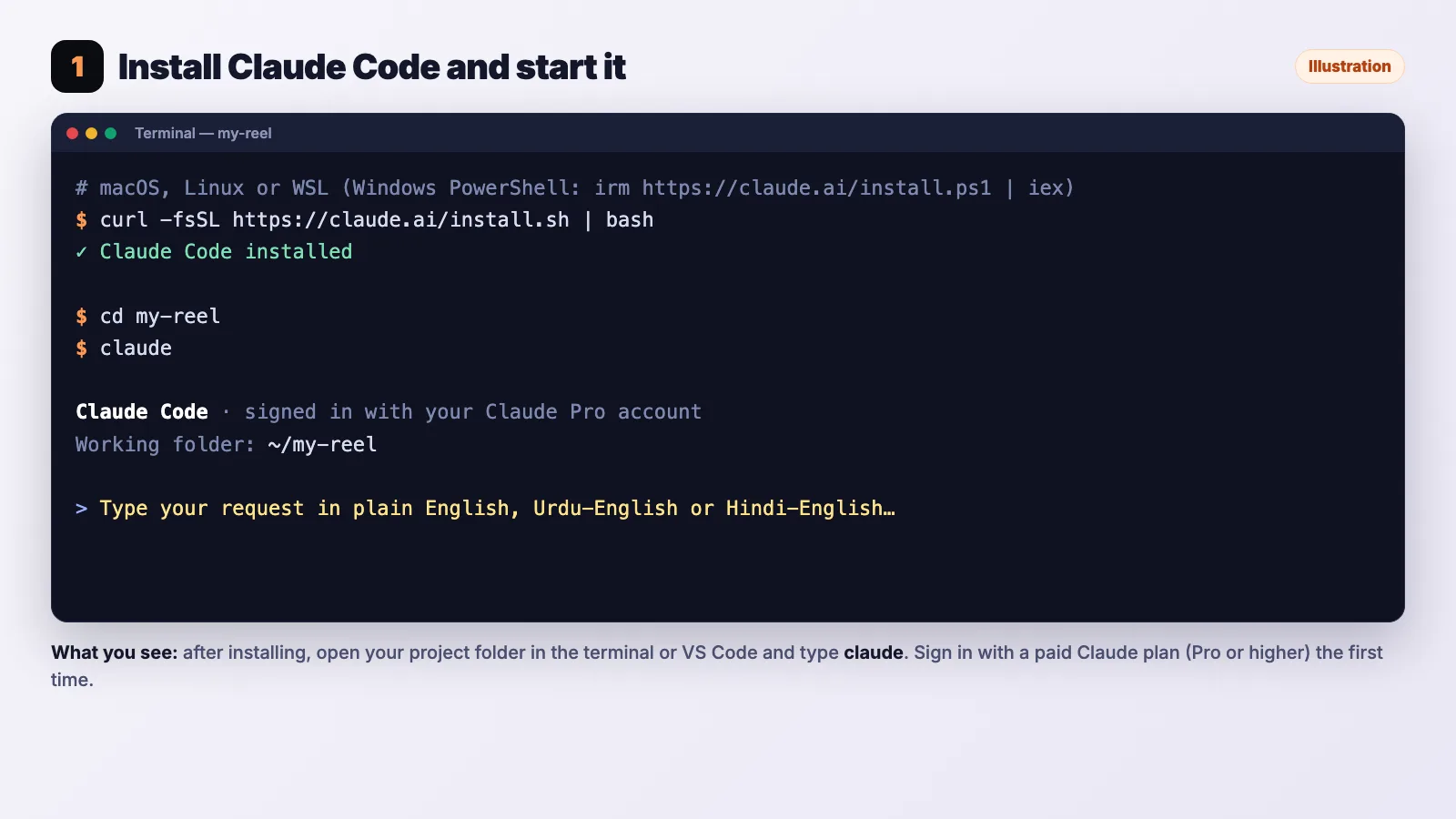
claude.Step 2: install FFmpeg and Whisper
brew install ffmpeg                  # macOS (Homebrew)
winget install --id Gyan.FFmpeg -e   # Windows
sudo apt install ffmpeg              # Ubuntu / WSL
pip install -U openai-whisper
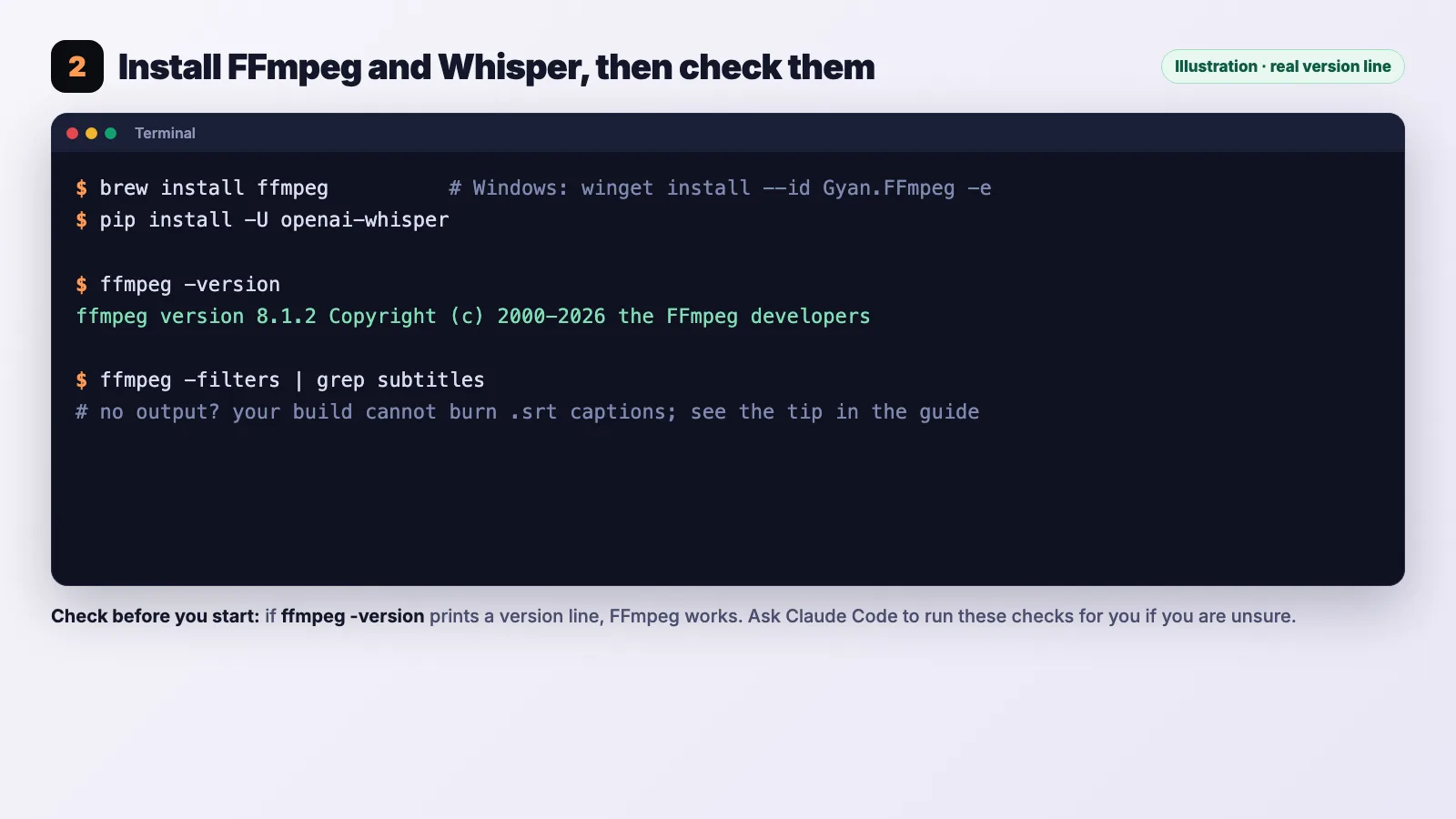
ffmpeg -version prints a version line.Step 3: put your footage in one project folder
Create a folder such as my-reel/ with raw/, music/ and exports/ inside. Open the folder in your terminal or VS Code and type claude. Claude Code can only see the files in this folder, which keeps client footage organised and private.
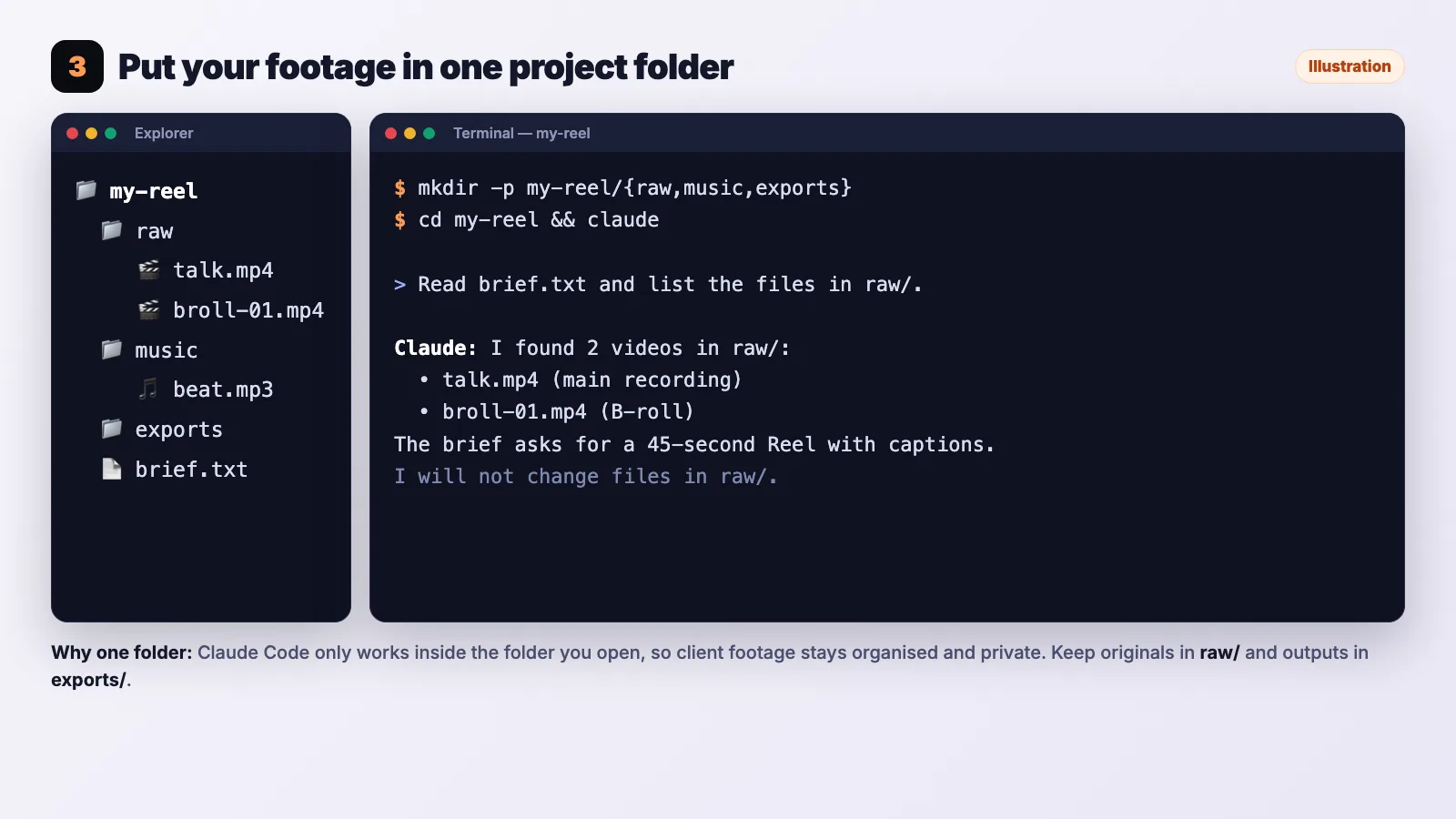
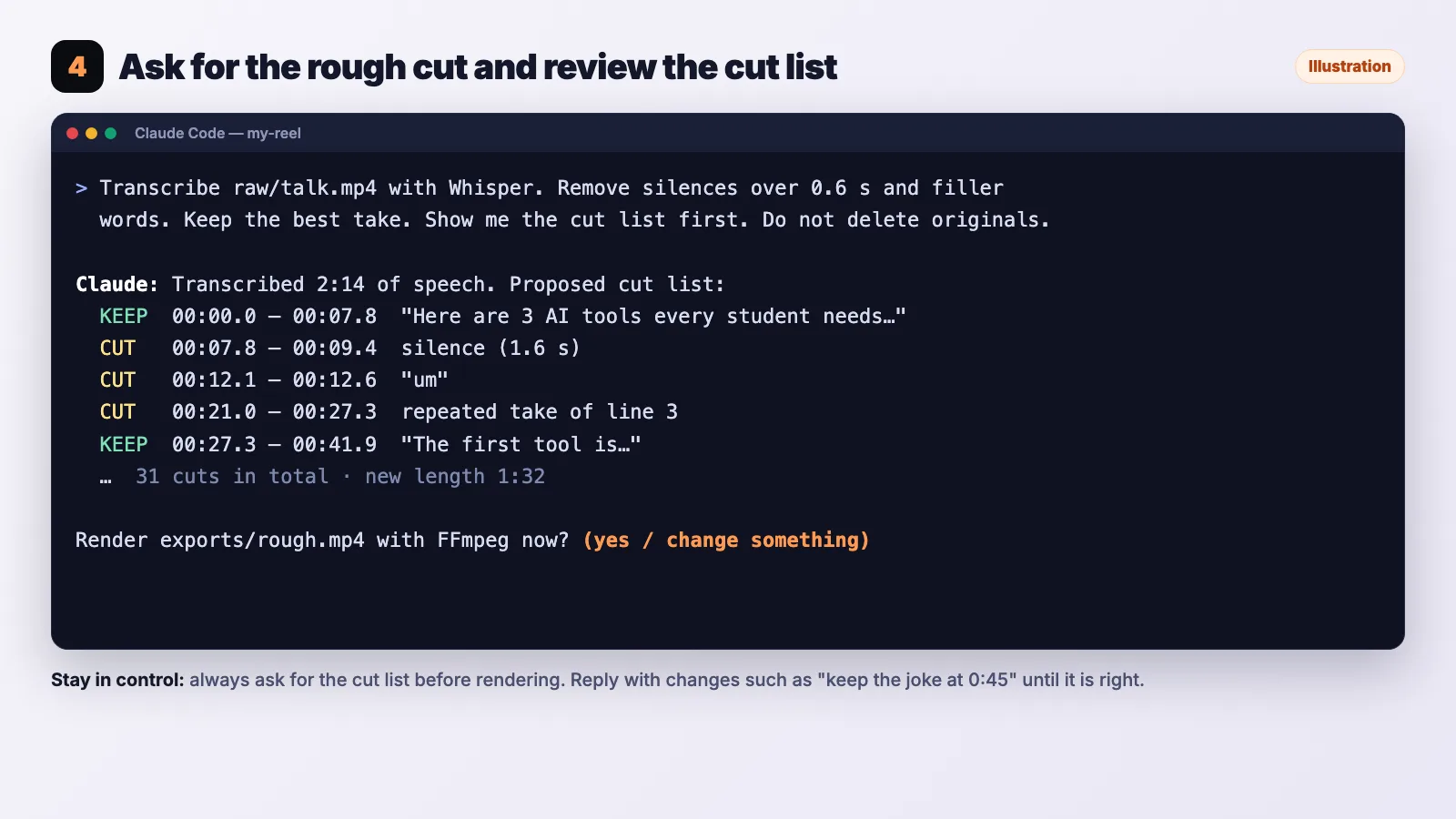
raw/, music/ and exports/.Step 4: ask for the rough cut
Transcribe raw/talk.mp4 with Whisper (language: English, model: small).
Remove silences longer than 0.6 s and filler words (um, uh, matlab, basically).
Keep the best take when I repeat a sentence. Show me the cut list first,
then render exports/rough.mp4 with FFmpeg. Do not delete any original file.
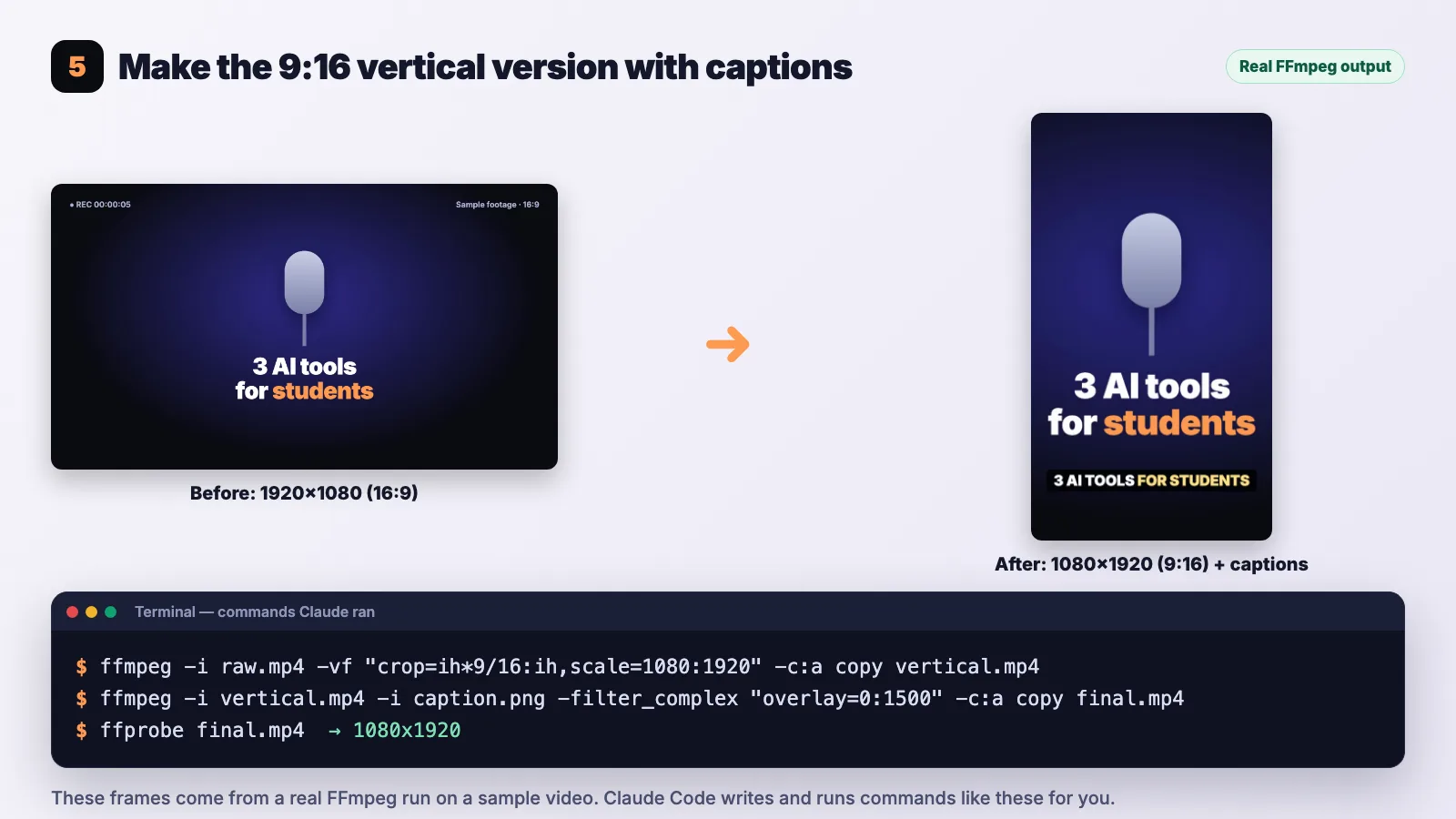
Step 5: captions, titles and vertical versions
# cut a 30-second clip without re-encoding
ffmpeg -ss 00:00:05 -to 00:00:35 -i rough.mp4 -c copy clip.mp4
# make a 9:16 vertical version for Reels, Shorts and TikTok
ffmpeg -i clip.mp4 -vf "crop=ih*9/16:ih,scale=1080:1920" -c:a copy vertical.mp4
# burn in captions from a Whisper .srt file
ffmpeg -i vertical.mp4 -vf subtitles=clip.srt final.mp4
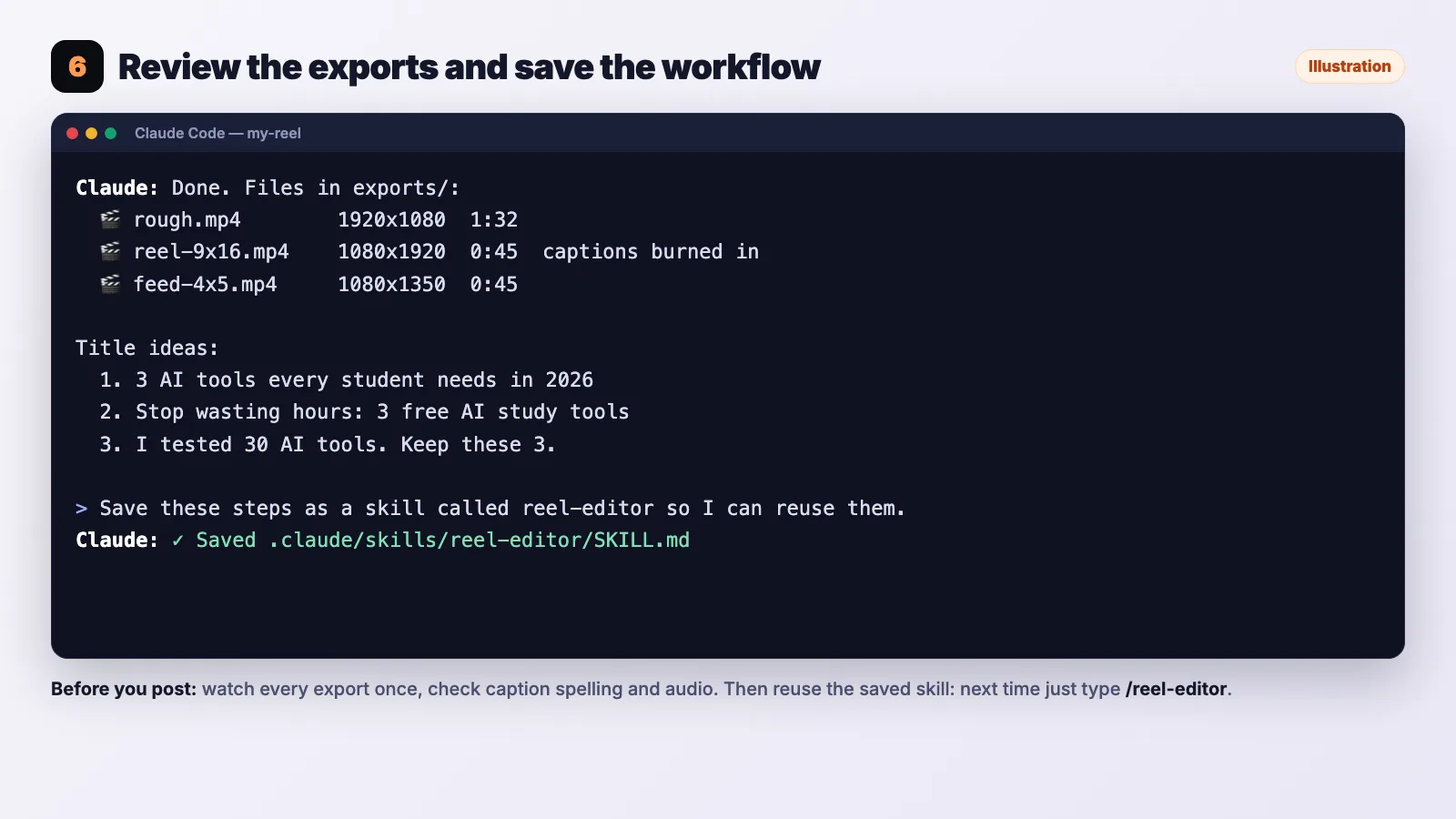
Step 6: review, then reuse the workflow
Watch every export before you publish. When the result is good, ask Claude Code to save the steps as a skill or a script. The next video then takes minutes instead of hours. Finally, ask Claude for three title options, a description and hashtags.
Claude video editing skill (GitHub): what it is and how to install it
A Claude skill is a folder with a SKILL.md file of instructions that Claude loads when a task needs it. There is no official Anthropic video editing skill; the official anthropics/skills repository covers documents, design and other tasks. The “claude video editing skill github” searches mostly lead to community skills.
- browser-use/video-use is the most popular one (MIT licence). It removes filler words and dead air and adds short audio fades at each cut. It also colour grades, burns in captions and adds overlays made with HyperFrames or Remotion. Moreover, it checks its own render after each cut. It needs FFmpeg and an ElevenLabs API key.
- OpusClip skill (beta) clips long videos with your OpusClip account and credits.
- Your own skill. Save your editing style (caption font, cut rules, export sizes) in a
SKILL.mdso every video looks consistent.
git clone https://github.com/browser-use/video-use
mkdir -p ~/.claude/skills
ln -s "$PWD/video-use" ~/.claude/skills/video-use
Personal skills live in ~/.claude/skills/ and project skills in .claude/skills/; see the Claude Code skills docs. On claude.ai, you can upload a skill as a ZIP file under Customize › Skills. Community skills are not reviewed by Anthropic, so read the code before you install one, and never paste API keys into a public repository.
Remotion and HyperFrames: animated videos written as code
Remotion and HyperFrames let Claude build animated videos from code: kinetic captions, lower thirds, explainer scenes, charts and reusable templates. You describe the scene; Claude writes it, previews it and renders an MP4.
- Official Claude skills:
npx skills add remotion-dev/skills - New project with skills:
npx create-video@latest --skills - Free for individuals and companies of up to 3 people; larger companies need a company licence
- Plain HTML, CSS and JavaScript, rendered with headless Chrome and FFmpeg
- Claude Code plugin:
claude plugin marketplace add heygen-com/hyperframes, thenclaude plugin install hyperframes@hyperframes - Free and open source (Apache-2.0)
Use the Remotion skills. Make a 20-second 1080x1920 video for my Reel:
title "3 AI tools for students", one tool per scene with an icon and a
short line, word-by-word captions at the bottom, brand colour #FF9A52.
Render it to exports/tools-reel.mp4.
Which one to choose? If you know React, choose Remotion. If you know HTML and CSS, or you want a fully open-source licence for client work, HyperFrames is simpler.
Editors and MCPCapCut, DaVinci Resolve and MCP: let Claude drive your editor
MCP (Model Context Protocol) lets Claude control other apps. For video, this means Claude can work inside the editor you already know.
- DaVinci Resolve MCP. The community davinci-resolve-mcp server (MIT) lets Claude manage projects, the media pool, timelines, markers, colour and renders. Resolve must be running with Preferences › General › External scripting set to Local. Its README notes that external scripting works fully in Resolve Studio ($295), with limited workarounds for the free version.
- CapCut MCP. CapCut has no official MCP server or public editing API. Community projects such as VectCutAPI build CapCut or JianYing draft files with subtitles, picture-in-picture, filters and keyframes. You then open and finish them in CapCut. Use them for your own projects and read CapCut’s terms first.
- “CapCut Claude” without MCP. The simplest method still works best for beginners. Ask the Claude app for a script, a cut list with timestamps and captions, then edit in CapCut by hand.
Claude vs ChatGPT vs Gemini for AI video editing
All three assistants help creators, but in different ways. Choose by the job, and test the free plans before you pay. For video editing with Claude, the big advantage is Claude Code.
| Job | Claude | ChatGPT | Gemini |
|---|---|---|---|
| Scripts, hooks and captions | Strong, natural writing | Strong | Strong |
| Running editing tools on your computer | Claude Code with Skills and MCP | Codex agent | Gemini CLI |
| Ready-made video skills and plugins | Remotion, HyperFrames, video-use, OpusClip | Check its plugin store | Check its extensions |
| Best for | Agentic editing workflows | General assistant | Google ecosystem and YouTube research |
In this guide we focus on Claude because its Skills, MCP connectors and Claude Code fit video editing workflows especially well. Nevertheless, the same FFmpeg and Remotion steps work with any coding agent.
EarnHow people earn with AI video editing on Fiverr and Upwork
Editors earn by selling clear packages: short-form edits, podcast clips, faceless YouTube videos, explainers and monthly social media management. AI tools let one editor deliver what used to need a small team, so you can take more clients or charge for speed.
| Platform | How it works | Typical prices seen | Fee |
|---|---|---|---|
| Fiverr | Clients buy your fixed packages (gigs) | Many short-form and Reels gigs start at about $5–$35 per video; experienced sellers charge much more | Fiverr keeps 20% of each order |
| Upwork | You send proposals for posted jobs, hourly or fixed price | Upwork’s hiring guide lists roughly $10–$60 an hour for video editors | Variable service fee; check your contract |
| Direct clients | Creators, coaches, shops and agencies you pitch yourself | Monthly retainers per number of videos | No platform fee |
Your first client in 5 steps
- Pick one niche: podcasts, coaches, real estate, education or gaming.
- Make 3 sample videos in that niche with your Claude workflow.
- Create one offer: for example “10 captioned Reels from your podcast in 72 hours”.
- List it as a Fiverr gig, send 5 Upwork proposals a day, and pitch 10 creators directly.
- Deliver fast and ask for a review, then raise your price after 5–10 good reviews.
Freelance income calculator
Fee presets:
The calculator uses 52 weeks ÷ 12 months. It ignores taxes, withdrawal fees and currency conversion. Upwork’s service fee varies, so enter the fee shown in your own contract.
For a wider view of freelancing with AI, read my guide on freelancing with AI agents in the global market.
Social mediaManage social media with Claude: plan, create, schedule and report
Social media managers use Claude as a content team: one recording becomes a week of posts. Here is a simple system that works for your own channels and for clients. It builds on the same video editing with Claude workflow.
- Plan: ask Claude for a monthly content calendar with 3–4 content pillars for your niche.
- Repurpose: turn one long video into 5–10 shorts with Claude Code, plus 3 text posts, a carousel and a newsletter.
- Design: create thumbnails and carousels with the official Canva connector.
- Schedule: connect the official Buffer or Metricool MCP server so Claude can draft and schedule posts and read analytics. Keep a human approval step.
- Report: every week, ask Claude to summarise what worked and what to post next.
claude mcp add --transport http buffer https://mcp.buffer.com/mcp
claude mcp add --transport http metricool https://ai.metricool.com/mcp
Want the full content workflow? Read my guide to social media content creation with Claude Code.
CreatorsAI video editing workflows for every kind of creator
Video editing with Claude is not only for YouTubers. In fact, almost anyone who publishes video can save hours each week.
| Creator | Best Claude workflow |
|---|---|
| YouTubers | Script with Claude, rough cut with video-use or FFmpeg, chapters and titles from the transcript |
| Podcasters | Find the 10 best moments in the transcript, cut vertical clips with captions |
| Teachers and course creators | Explainer scenes with Remotion or HyperFrames, captions in Urdu, Hindi and English |
| Small businesses and shops | Product Reels from photos and short clips, scheduled with Buffer or Metricool |
| Faceless channels | Script, voice-over, AI B-roll from Higgsfield and automated captions |
| Agencies and freelancers | Saved skills per client brand, batch exports in every aspect ratio, weekly reports |
Start with one workflow and measure the time you save. Add the next one only when the first runs smoothly. Above all, video editing with Claude should save time without lowering quality.
ResponsibilityCopyright, AI labels and quality checks
- Disclose realistic AI content. YouTube asks creators to label realistic altered or synthetic content, and Meta and TikTok show AI labels too.
- Respect copyright. AI tools do not remove copyright from music, clips or images. Use licensed or royalty-free material.
- Protect client footage. Read each tool’s data policy and keep API keys out of shared folders.
- Check everything. Watch the full export, check caption spelling, audio levels and facts before you publish.
AI video editing flash cards: test yourself
Tap a card to flip it and see the answer. Flip all ten to finish the deck. Small flash cards also pop up while you read; you can switch them off at any time.
Cards 1–5: market, tools and workflow
Cards 6–10: skills, editors, earning and social media
Quiz: are you ready to edit videos with Claude?
8 quick questions · instant feedback · nothing is saved
Part 1: tools and workflow
1Which Claude product runs FFmpeg and other tools on your computer?
Claude Code is the agent that runs commands and code on your computer. It comes with paid plans such as Pro.
2You want word-by-word animated captions and titles written as React code. Which tool fits?
Remotion makes videos with React and has official Claude skills.
3What should you do before Claude renders the rough cut?
Review the cut list and never let a tool delete your original files.
4Which command makes a 9:16 vertical video?
Cropping to ih*9/16 by ih and scaling to 1080×1920 makes a vertical video for Reels, Shorts and TikTok.
Part 2: skills, rules and earning
5Where do personal Claude Code skills live?
Personal skills live in ~/.claude/skills/ and project skills in .claude/skills/.
6Your video shows a realistic AI-generated person. What should you do on YouTube?
YouTube asks creators to disclose realistic altered or synthetic content.
7You have no portfolio yet. What is the best first step to get clients?
Clients buy proof. Three samples in one niche make your gig and proposals convincing.
8What turns one long video into a week of content?
Cut 5–10 shorts, write posts, a carousel and a newsletter from one recording, then schedule them.
Codanics video lessons on Claude, video and AI workflows
Free lessons in Urdu/Hindi from the Codanics YouTube channel. Click a video to play it here.
 1:06
 1:48
 1:50
 4:01
 5:55
 2:02:27
More Claude, AI and creator guides on Codanics
- 🤖Claude AI: the complete guideModels, Claude Code, Skills, MCP and plans
- 🚀Learn and earn with Claude Code in 30 daysBuild a startup and get your first client
- 📱Social media content creation with Claude CodeReels, posts and scripts
- 💼Freelancing with AI and AI agentsWin global clients
- ✍️Prompt engineering guideBetter prompts for Claude
- 🤖11 AI agents in PythonFree source code
- 🧰239 free Codanics toolsBuilt with Claude Code
- 🧠Free quizzesTest what you learn
- 🐍Python ka Chilla: Build AI AgentsPython from zero to AI agents
- 🧠AI ka Chilla 2026ML, deep learning, LLMs and agents
- 🤝One-to-one sessionBook Dr. Aammar Tufail
- 💬Codanics WhatsApp channelNew tools and lessons
AI video editing with Claude: FAQ
Video editing with Claude: the basics
Can Claude edit videos?
Yes, with the right tools. The Claude app plans, scripts and writes captions, while Claude Code runs real editing tools such as FFmpeg, Whisper, Remotion, HyperFrames and DaVinci Resolve to cut, caption, animate and export your video. You direct the edit and check the result.
What is the Claude video editing skill?
It usually means a community Claude Code skill that edits video, most often browser-use/video-use on GitHub. It removes filler words and dead air, adds captions, colour and overlays with FFmpeg. There is no official Anthropic video editing skill.
Is video editing with Claude free?
Partly. The Claude app has a free plan for scripts and captions, and FFmpeg, Whisper, HyperFrames and the free DaVinci Resolve cost nothing. Claude Code, which runs the tools for you, needs a paid Claude plan such as Pro at $20 a month.
How do I use Claude with CapCut?
The simplest way is to ask the Claude app for a script, a cut list with timestamps and captions, then edit in CapCut by hand. CapCut has no official API or MCP server; community projects such as VectCutAPI can build CapCut drafts from Claude Code.
Editors and AI video tools
What is DaVinci Resolve MCP?
A community MCP server (samuelgursky/davinci-resolve-mcp) that lets Claude control DaVinci Resolve through its scripting API: projects, media, timelines, markers, colour and renders. External scripting works fully in Resolve Studio ($295).
What is Remotion?
Remotion is a framework for making videos with React code. It has official Claude skills, so Claude can create animated titles, captions and explainer videos and render them as MP4. It is free for individuals and companies of up to 3 people.
What is HyperFrames?
HyperFrames is HeyGen's open-source (Apache-2.0) framework that turns HTML, CSS and JavaScript into MP4 video using headless Chrome and FFmpeg. It has an official Claude Code plugin and skills.
What is Higgsfield?
Higgsfield is an AI image and video generation platform with 35+ models. It has an official MCP connector, so you can generate clips from a Claude chat. It has a free plan, and paid plans start at $19 a month.
Earning, comparison and hardware
Can I earn money with AI video editing?
Yes. Upwork reported 329% growth in demand for AI video generation and editing in 2025. Editors sell short-form edits, podcast clips, faceless YouTube videos and social media management on Fiverr, Upwork and directly to creators and businesses.
How much do video editors charge on Fiverr and Upwork?
Many short-form and Reels gigs on Fiverr start at about $5–$35 per video, and Upwork's hiring guide lists roughly $10–$60 an hour for video editors. Experienced editors charge more. Fiverr keeps 20% of each order; Upwork's fee varies.
Is Claude better than ChatGPT or Gemini for video editing?
For agentic editing workflows, Claude Code with its Skills and MCP connectors is a strong choice, with ready-made Remotion, HyperFrames and video-use skills. ChatGPT and Gemini are also good for scripts and research. Test the free plans of each.
Do I need a MacBook for AI video editing?
No. Claude Code, FFmpeg, DaVinci Resolve and CapCut run on Windows too. More RAM and a recent graphics chip make rendering faster on any computer.
Roman Urdu/Hindi
Claude se video edit kaise karein?
Claude Code aur FFmpeg install karein, apni video ek folder mein rakhein aur Claude ko likhein: silence aur filler words hatao, captions banao aur 9:16 version export karo. Phir result khud check karein.
Kya AI video editing se Fiverr par paise kama sakte hain?
Ji haan. Pehle ek niche chunein, 3 sample videos banayein, phir Fiverr gig aur Upwork proposals se shuru karein. Fiverr har order ka 20% rakhta hai.
No questions match. Try another word.
Edit your next video with Claude this week
Install Claude Code and FFmpeg, run the rough-cut prompt on one video, and post the result. Then follow the free Codanics 30-day plan to turn the skill into income.
Sources
- Upwork: In-Demand Skills 2026 (AI video generation and editing +329%)
- Upwork: hire video editors (rates)
- Fiverr Business Trends Index, fall 2025
- Fiverr: Reels editing gigs
- YouTube: Neal Mohan at Cannes 2025 (200B daily Shorts views)
- Goldman Sachs: the creator economy could approach $480B by 2027
- Claude Code skills documentation
- Using skills on claude.ai
- Anthropic official skills repository
- browser-use/video-use (community video editing skill)
- Remotion: Agent Skills
- Remotion licence and pricing
- HyperFrames by HeyGen
- DaVinci Resolve (Blackmagic Design)
- davinci-resolve-mcp (community)
- VectCutAPI: CapCut / JianYing drafts and MCP (community)
- Higgsfield MCP
- OpusClip: Claude skills for video editing
- FFmpeg
- OpenAI Whisper
- Buffer MCP server
- Metricool MCP for Claude
- Canva MCP server
- Claude pricing
Tool details, prices and market figures were checked on 29 November 2026. The Upwork and Goldman Sachs figures come from their published announcements; Fiverr gig prices are typical starting prices seen on Fiverr search pages. Prices and plans change often, so check before you pay.
About the author. Dr. Muhammad Aammar Tufail is the founder of Codanics. He teaches AI, data science, Python, AI agents and scientific writing in Urdu and Hindi, and edits Codanics reels and builds its free tools with Claude Code.
One-to-one sessions: you can now book consultancy sessions about data science, AI workflows, your research project, mentorship, your PhD and Master’s thesis and much more at mentorship.codanics.com/book.
This guide is independent and educational. Codanics is not affiliated with Anthropic, HeyGen, Remotion, Blackmagic Design, ByteDance (CapCut), Higgsfield, OpusClip, Fiverr or Upwork.
